The Browser Kept a Receipt: Proving a Download Was the Same File with ETag
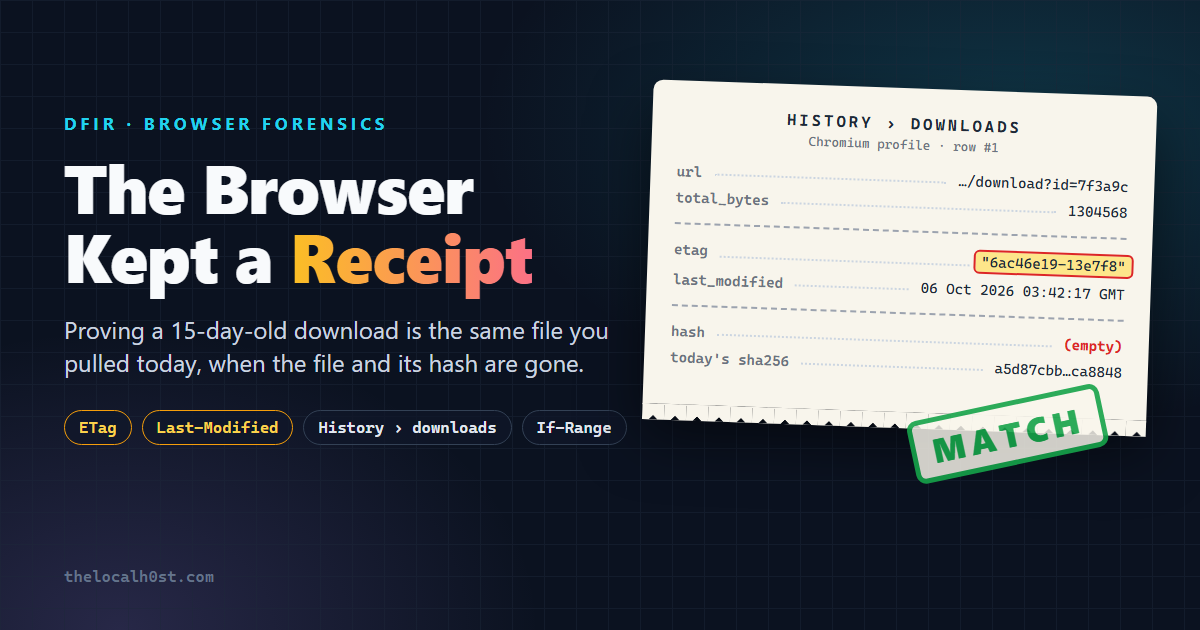
How do you prove that the file a user downloaded 15 days ago is the exact same file you downloaded today, when the file is gone, nobody recorded a hash, and the only thing left is the browser’s history?
That was the question on my desk during a recent investigation. No sample. No hash. Just a browser profile and a URL that was, annoyingly, still alive.
The answer was hiding in a column most of us scroll right past: etag.
The Case
The short version (details sanitized, of course):
- A user downloaded a ZIP from a link. Call it
Invoice_Oct2026.zip. - It was malicious.
- By the time we had the machine, the file was gone. It wasn’t in Downloads or in quarantine, and no log we had carried a hash of it.
- What survived: the Chromium History database, which showed the download from a URL like
hxxps://cdn-share[.]example/download?id=7f3a9c.
The URL was still live. So I did the obvious thing and downloaded it myself. Now I had a sample and a SHA-256. Case closed?
Not even close.
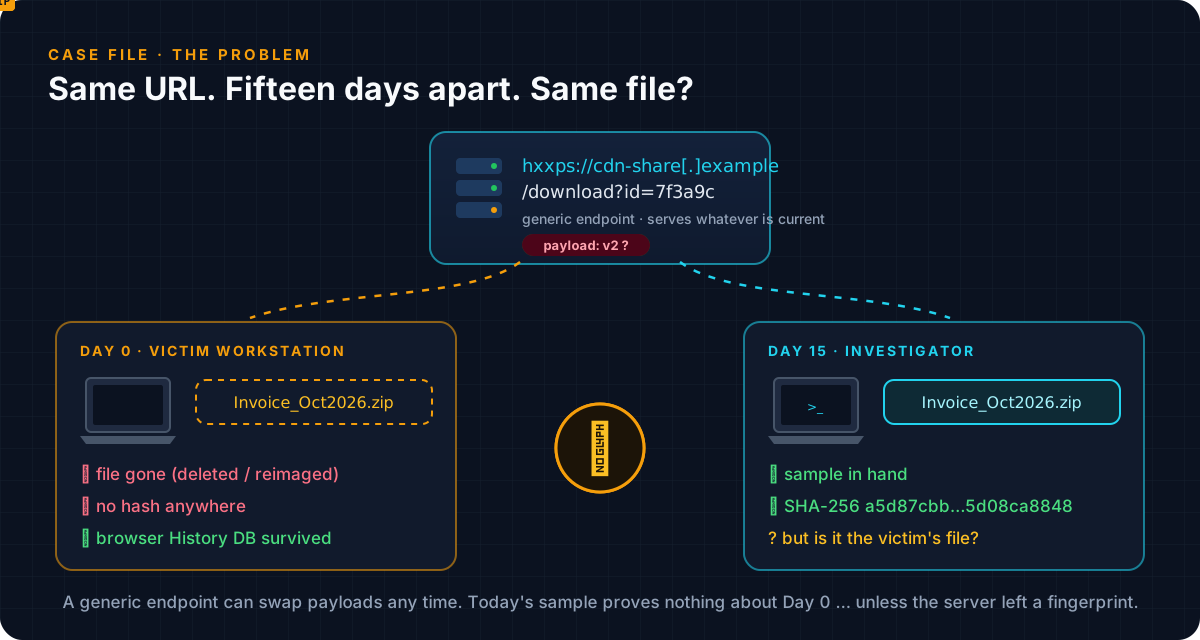 A generic endpoint can hand out anything, to anyone, at any time
/download?id=... is a generic endpoint. It serves whatever is behind it right now. Malware operators rotate payloads all the time: per day, per campaign, per victim, per country. My Day-15 sample proves exactly one thing: what the server sent me, today.
To put my hash in the report as “the file the user downloaded”, I needed a link between their response and mine. Without the file, I had nothing to hash on their side.
“Same URL” does not mean “same file”. Never let a URL match stand in for a content match.
Enter ETag: The Server’s Fingerprint
Every time a web server sends a file, it can attach two small headers that describe the version of what it’s sending:
| Header | What it says | Example |
|---|---|---|
ETag | An identifier for this exact version of the resource. If the resource changes, the ETag must change. | "6ac46e19-13e7f8" |
Last-Modified | When the server believes this version last changed (to the second) | Tue, 06 Oct 2026 03:42:17 GMT |
Browsers and caches use them so they don’t download the same thing twice. They hand the ETag back with If-None-Match, and if nothing changed the server replies 304 Not Modified and skips the body:
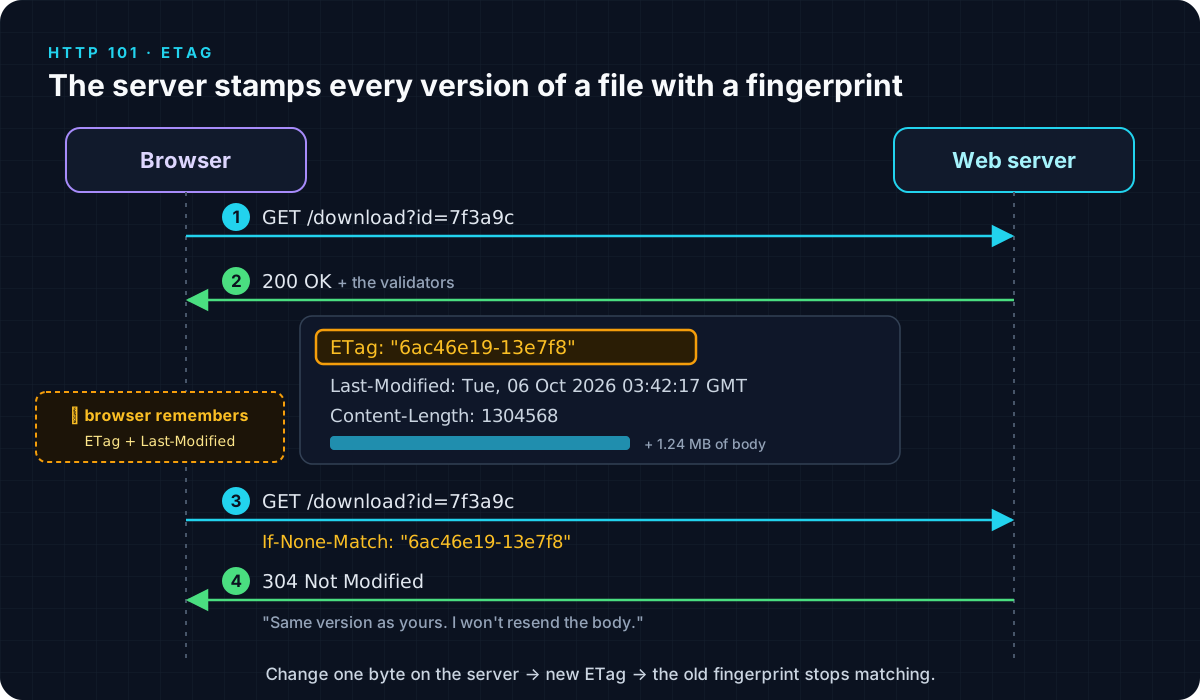 Change one byte on the server and you get a new ETag. That’s what makes it useful to us.
One detail matters a lot for forensics. ETags come in two strengths:
| Looks like | What the server is promising | |
|---|---|---|
| Strong | "6ac46e19-13e7f8" | Same tag means byte-for-byte identical |
| Weak | W/"6ac46e19-13e7f8" | “Semantically equivalent”. The bytes may differ. |
So if the server sent the same strong ETag on Day 0 and on Day 15, the server is telling you it sent the same bytes.
Great. But how do I know what ETag the user got 15 days ago? I wasn’t there.
The browser was.
Wait, Why Would a Browser Save That?
Browsers don’t normally keep response headers around. But Chromium makes an exception for downloads, and the reason is very practical: downloads break.
Wi-Fi drops at 62%. Laptop lid closes. Browser crashes. To resume instead of starting over, the browser asks for just the missing bytes (Range) and attaches the version it already has (If-Range). If the server still has that version, it sends the rest. If the file changed, it sends the whole new file, so you never end up with half of v1 glued to half of v2.
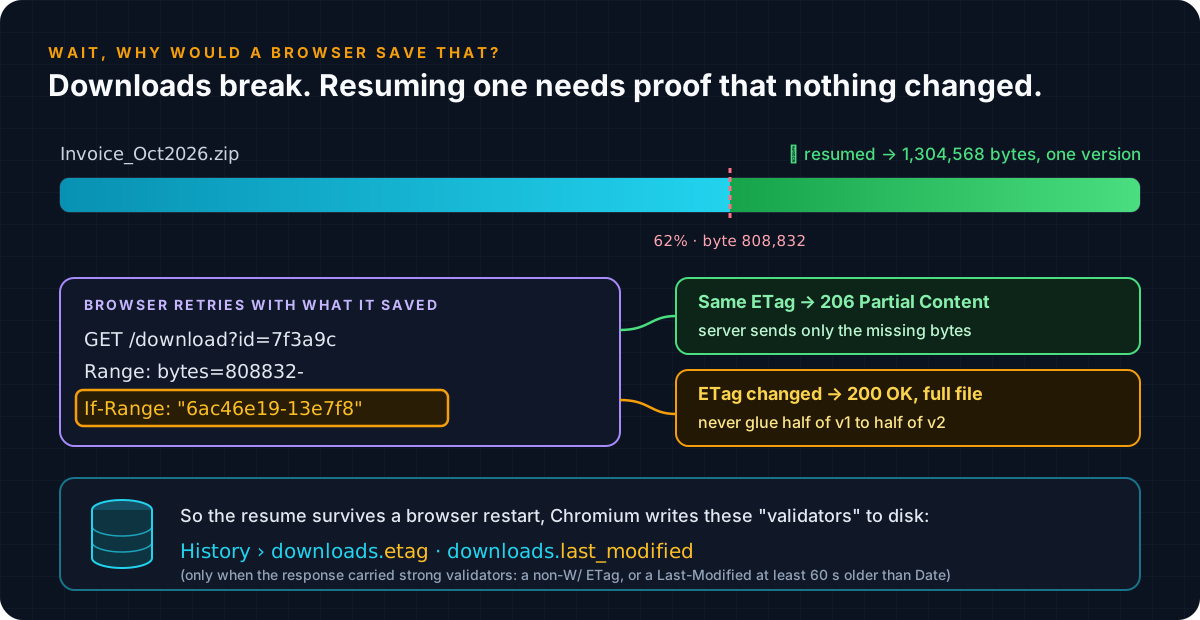 Resuming a download needs the validators, so Chromium writes them to disk
For that to survive a browser restart, the validators have to be written to disk. They go in the downloads table of the History database. Chromium even names them that way in its source: the migration that adds these columns is called MigrateDownloadValidators.
Here is the rule, paraphrased from download_utils.cc and http_util.cc:
1
2
3
4
5
6
7
8
9
10
11
12
when a download response arrives:
    if the response has STRONG validators:      # HTTP/1.1+, and either
                                                #   an ETag without W/
                                                #   or a Last-Modified >= 60 s older than Date
        downloads.etag          <- raw ETag header
        downloads.last_modified <- raw Last-Modified header
    else:
        store nothing (both columns stay empty)

when resuming:
    Range: bytes=<already received>-
    If-Range: <etag, or last_modified if there is no etag>
🔑 Two forensic consequences. A populated
etagcolumn means the server sent strong validators over HTTP/1.1+, which is exactly the kind you can compare. An empty column does not mean the server sent nothing; the validators may simply not have been strong enough to keep.
Where the Receipt Lives
| Browser | History database |
|---|---|
| Chrome | %LOCALAPPDATA%\Google\Chrome\User Data\<Profile>\History |
| Edge | %LOCALAPPDATA%\Microsoft\Edge\User Data\<Profile>\History |
| Brave | %LOCALAPPDATA%\BraveSoftware\Brave-Browser\User Data\<Profile>\History |
| Chrome (macOS) | ~/Library/Application Support/Google/Chrome/<Profile>/History |
| Chrome (Linux) | ~/.config/google-chrome/<Profile>/History |
Always work on a copy, and take the -journal / -wal files along with it.
About the screenshots. I can’t publish case data, so everything below comes from a lab rebuild: a small local server behind a “generic”
/download?id=endpoint that builds ETags the same way nginx does, a fresh Microsoft Edge profile that downloaded a harmless ZIP, and DB Browser for SQLite on a sanitized copy of that History file. Every value is real output. Only the 15 days are compressed into a few minutes.
Open the copy, expand downloads, and there they are:
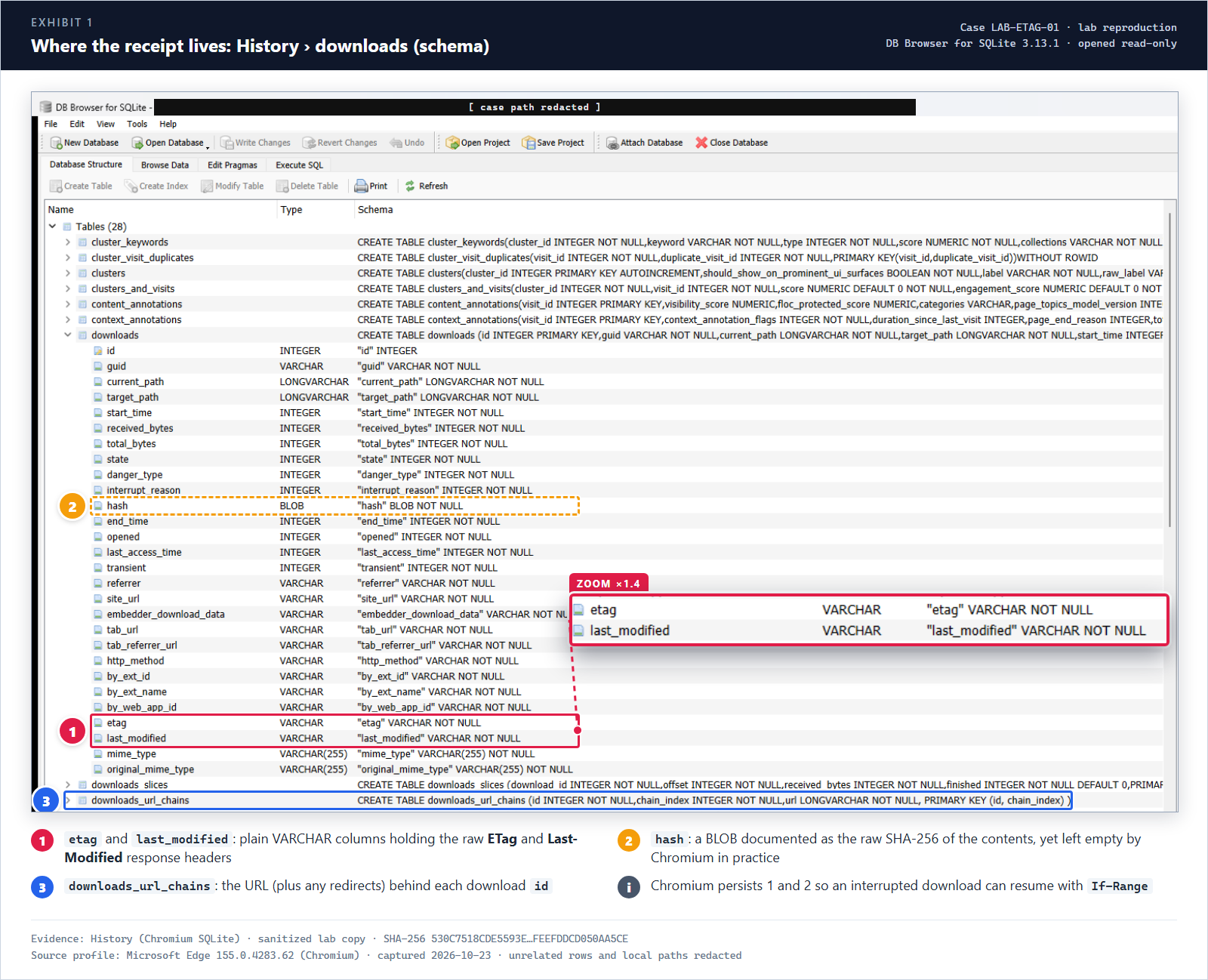 Exhibit 1:
 etag and last_modified sit right next to mime_type. Note the hash column as well.
Notice hash (②). Chromium’s own schema comment calls it the “Raw SHA-256 hash of contents”. It sounds like the end of this blog post, but it’s empty in practice. Hindsight’s source says the same thing: the column exists, but Chrome never populates it. So we’re back to the validators.
Here’s the query I use. It joins the download to its URL chain and converts Chromium’s WebKit timestamp (microseconds since 1601) to UTC:
1
2
3
4
5
6
7
8
9
SELECT d.id,
       datetime(d.start_time/1000000 - 11644473600, 'unixepoch') AS start_time_utc,
       c.url          AS download_url,
       d.total_bytes,
       d.etag,
       d.last_modified,
       hex(d.hash)    AS hash
FROM downloads d
JOIN downloads_url_chains c ON c.id = d.id;
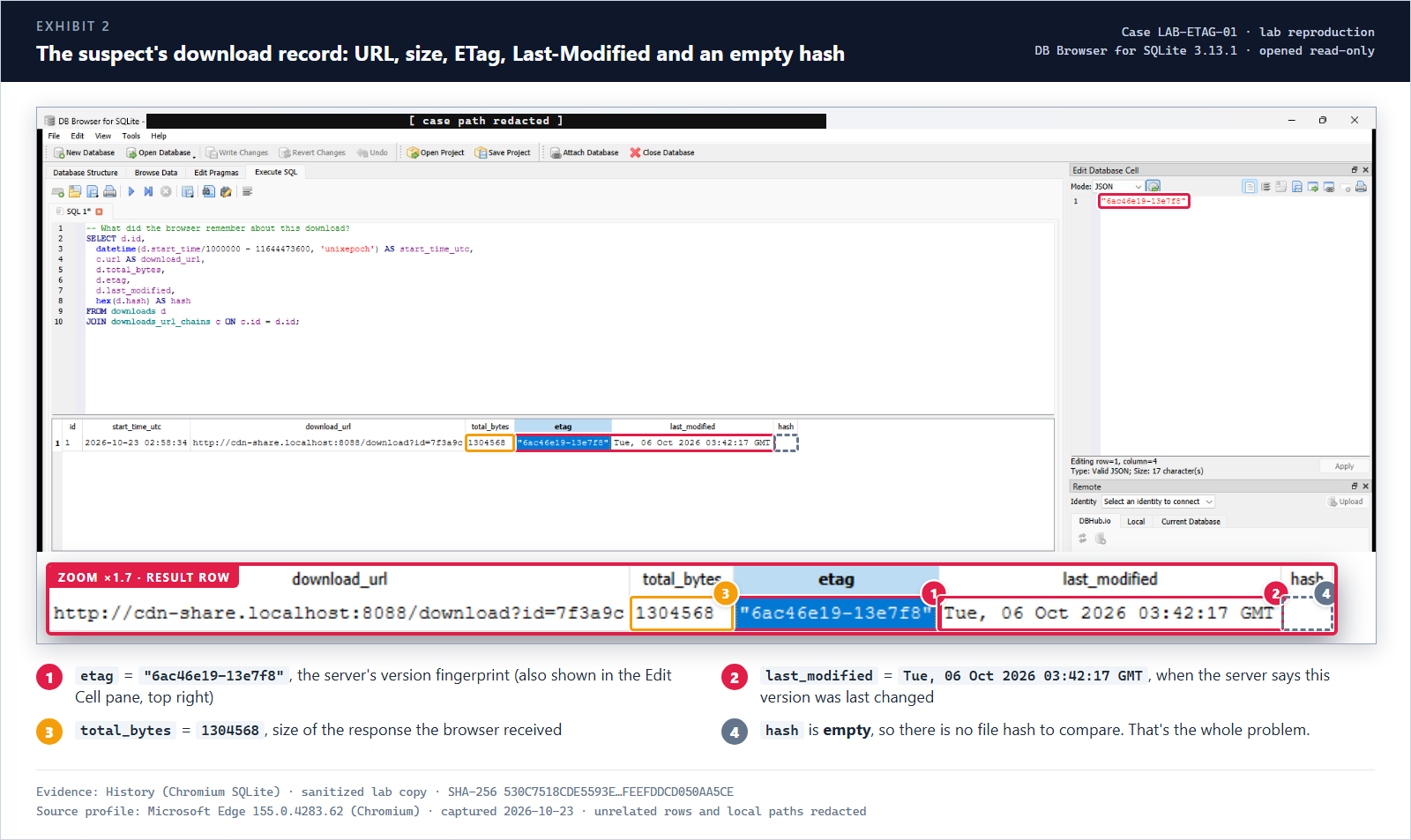 Exhibit 2: the receipt. URL, size, ETag and Last-Modified are all there, and the hash is empty.
Prefer a tool? Hindsight parses these too. In its XLSX timeline, download rows carry ETag and Last Modified columns.
This post covers the Chromium family (Chrome, Edge, Brave, Opera, …). Firefox stores download details differently, so check what your Firefox version actually records before assuming these fields exist there.
Reading the Fingerprint
ETags are officially opaque strings, and the server can put anything in them. In practice, a lot of servers build them out of file metadata. If you recognize the recipe, the ETag tells you even more.
"6ac46e19-13e7f8" is the classic nginx shape, hex(mtime)-hex(size). Its own source builds it with "%xT-%xO":
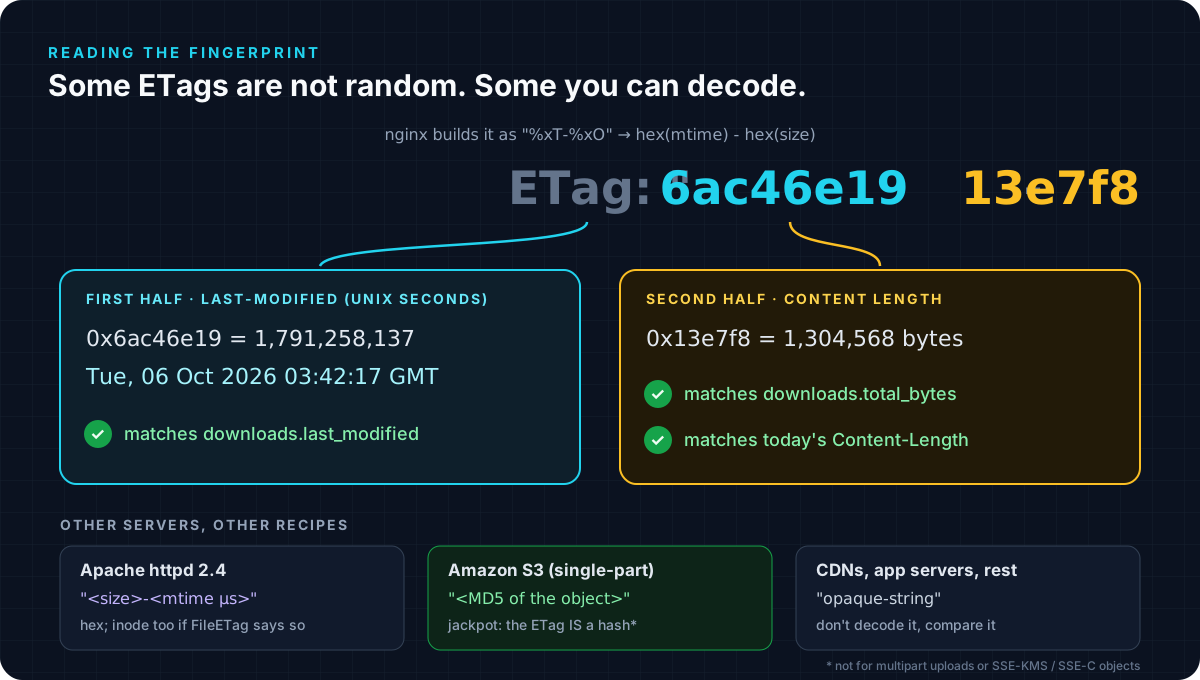 The ETag, the Last-Modified header and the byte count all have to agree with each other
1
2
3
4
5
>>> import datetime
>>> datetime.datetime.fromtimestamp(0x6ac46e19, datetime.timezone.utc)
datetime.datetime(2026, 10, 6, 3, 42, 17, tzinfo=datetime.timezone.utc)
>>> 0x13e7f8
1304568
The first half decodes to the exact last_modified value, and the second half is the exact total_bytes. Three fields recorded by the browser, all consistent with one another.
Other servers you’ll meet:
- Apache httpd 2.4:
"<size>-<mtime>"in hex, where mtime is in microseconds. The inode is added in front ifFileETagis configured to include it. - Amazon S3: for single-part uploads that are unencrypted or SSE-S3, the ETag is the MD5 of the object. If you see a 32-hex-character ETag with no
-Nsuffix from an S3-backed URL, MD5 your sample. That’s a real hash comparison, not just a validator match. (This doesn’t hold for multipart uploads or SSE-KMS / SSE-C objects.) - CDNs and app servers: often truly opaque. Don’t decode them, just compare them.
Day 15: Our Own Acquisition
Now collect the other side of the comparison. Two rules:
- Get the headers and the body from the same response. A
HEADis handy for a quick look, but-Dsaves the exact headers of theGETyou hash. - Look like the victim. Many delivery servers serve different content by User-Agent, referrer, or geography. Match the victim’s browser User-Agent and use the
referrer/tab_urlfrom the same History row. Acquire from an isolated analysis box, never from your daily driver.
1
2
3
curl.exe -sI "<url>"                                       # quick look at the validators
curl.exe -s -D headers.txt -o sample.bin "<url>"           # headers + body from ONE response
(Get-FileHash -Algorithm SHA256 .\sample.bin).Hash
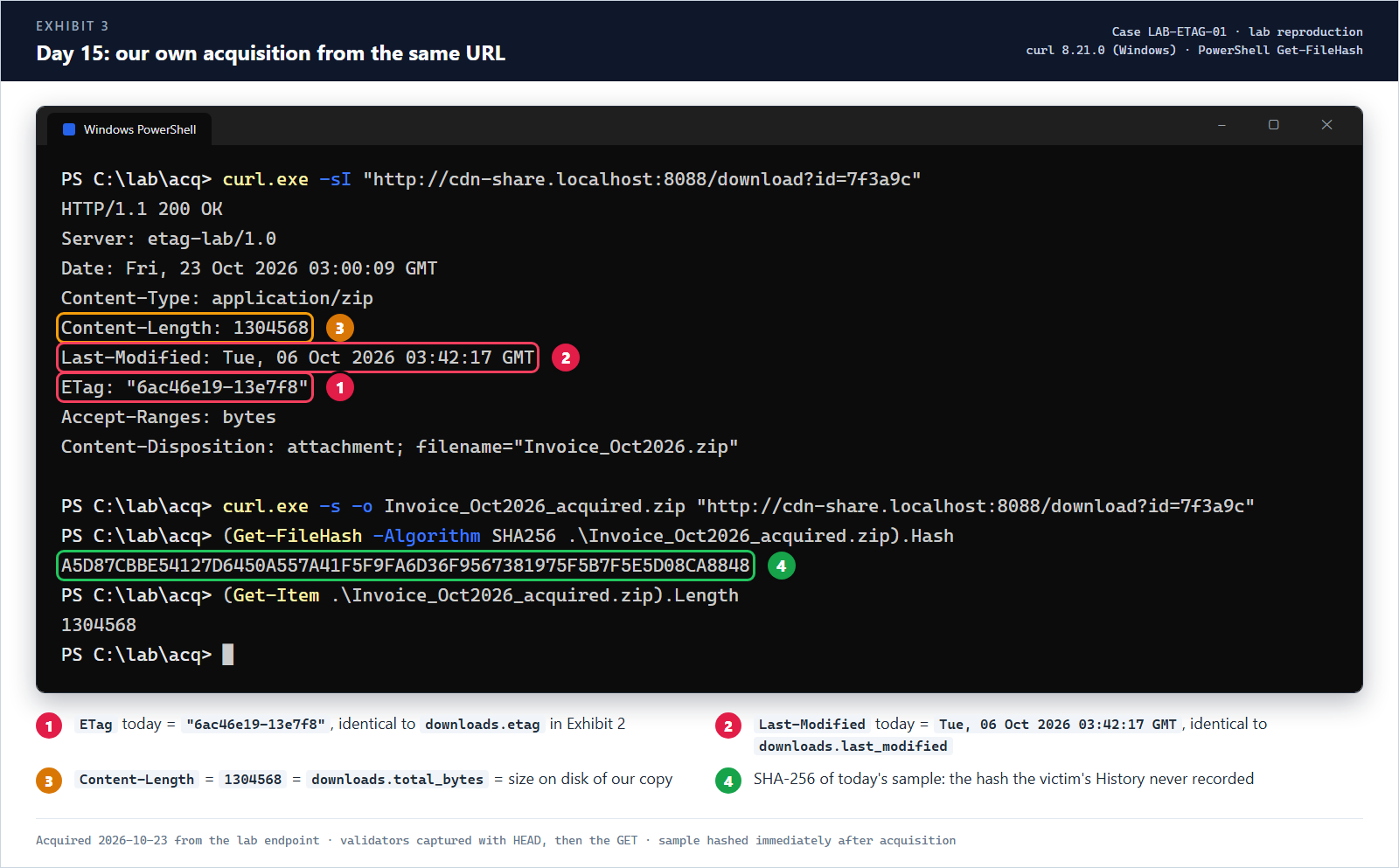 Exhibit 3: same URL, same strong ETag, same Last-Modified, same size. Plus a hash this time.
Bonus move: ask the server directly. Send the victim’s ETag back as If-None-Match. A 304 means the server is saying “that version is still the current one”. (Run this one from bash. Windows PowerShell 5.1 strips the inner quotes before curl sees them.)
1
2
3
4
5
6
7
$ curl -sI -H 'If-None-Match: "6ac46e19-13e7f8"' "http://cdn-share.localhost:8088/download?id=7f3a9c"
HTTP/1.1 304 Not Modified
Server: etag-lab/1.0
Date: Fri, 23 Oct 2026 03:00:12 GMT
ETag: "6ac46e19-13e7f8"
Last-Modified: Tue, 06 Oct 2026 03:42:17 GMT
Content-Length: 0
Connecting the Dots
Put the receipt next to today’s download and go row by row:
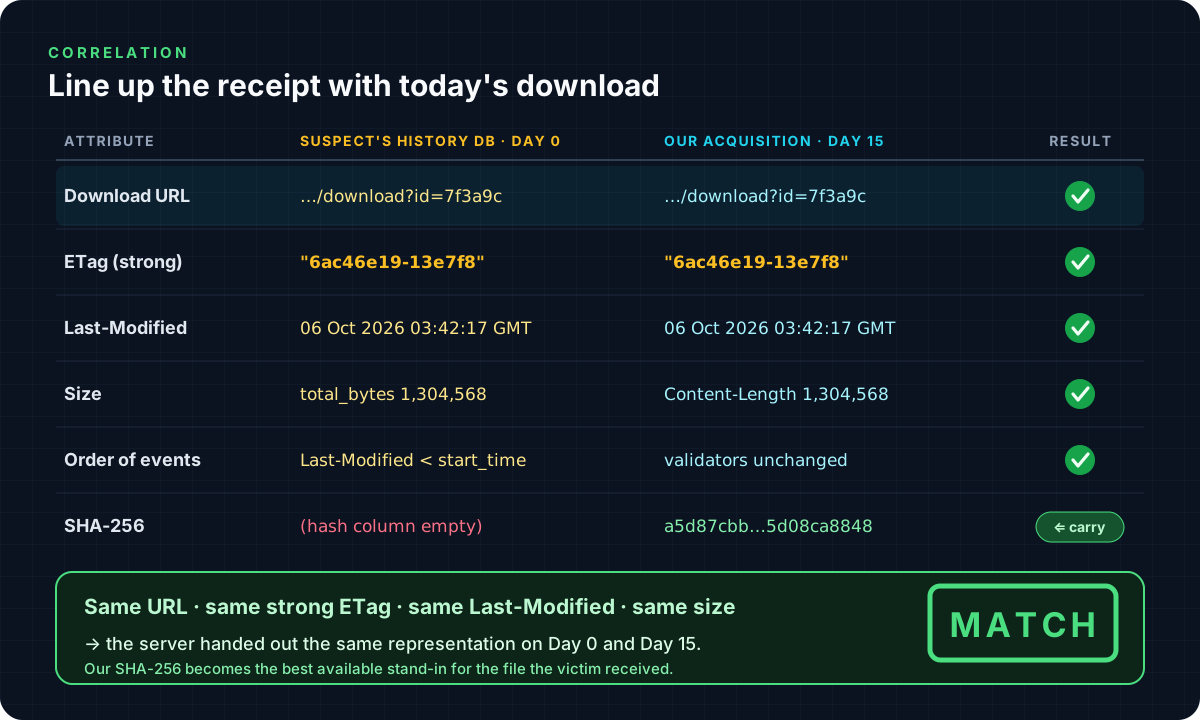 Every attribute the browser kept matches what the server sends today
The checklist I follow:
- Same final URL. Compare the last entry in
downloads_url_chains, not just the link that was clicked. Validators belong to one URL. - Same strong ETag. Exact string, quotes included, no
W/. - Same
Last-Modified. Exact string. - Same size.
total_bytes= today’sContent-Length= size of your sample on disk. - Order of events.
Last-Modifiedis earlier than the victim’sstart_time, so this version was already on the server when they downloaded it, and it is still the version being served. - Only then does your SHA-256 stand in for the victim’s file.
And the best part: the same check can also tell you no. In the lab I swapped the payload behind the same URL (the “attacker rotates on day 7” scenario) and ran the request again:
1
2
3
4
HTTP/1.1 200 OK
Content-Length: 1319344
Last-Modified: Wed, 14 Oct 2026 21:05:44 GMT
ETag: "6acfeea8-1421b0"
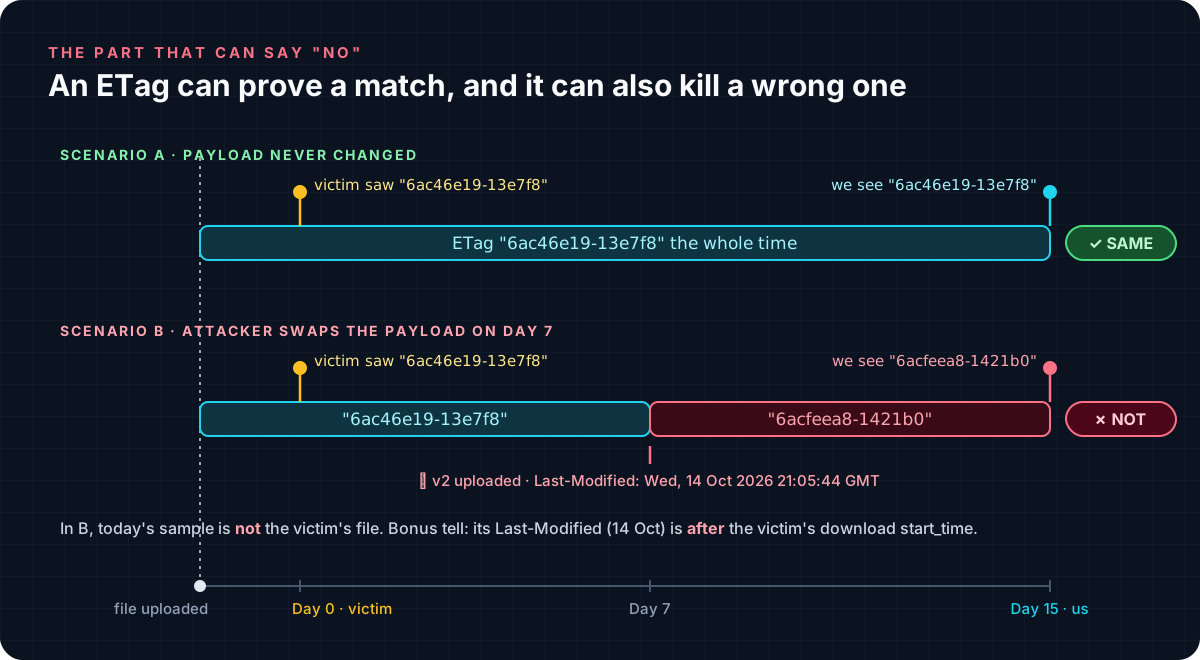 A different ETag, and a Last-Modified after the victim’s download: today’s sample is NOT their file
Without this check, that sample would have gone into the report as “the malware the user downloaded”. It wasn’t.
Where This Breaks
ETag is strong corroboration, but it is the server’s claim. Know the edges:
| Pitfall | What it means for you |
|---|---|
Weak ETag (W/) | Only “equivalent”, not byte-identical. Chromium won’t even store it unless Last-Modified qualifies as strong. |
Empty etag / last_modified | The server didn’t send strong validators. Absence is not evidence. |
| Attacker-controlled server | A server can send a constant or fake ETag on purpose. Cross-check size, Last-Modified, the decoded structure and the timeline. |
| Load-balanced / clustered servers | ETags built from inode or mtime can differ between nodes holding the same file, so a mismatch doesn’t always mean different bytes. |
| Compression / CDN rewriting | nginx turns strong ETags weak when it gzips a response, and CDNs may rewrite validators. Compare like with like. |
| Content negotiation | A different User-Agent, Accept-Encoding or geography can get you a different representation. |
How I’d Write It in the Report
Say exactly what the evidence supports and nothing more. A template:
The Chromium History database from HOST-01 records download id 1 from
hxxps://cdn-share[.]example/download?id=7f3a9cat[start_time UTC], with server validators ETag"6ac46e19-13e7f8"(strong) and Last-ModifiedTue, 06 Oct 2026 03:42:17 GMT, and a size of 1,304,568 bytes. On[acquisition date], the examiner acquired the same URL; the server returned identical validators and size (SHA-256A5D87CBB…5D08CA8848). Under HTTP validator semantics (RFC 9110 §8.8), the server represented both responses as the same version of the resource. The acquired sample is therefore assessed, with high confidence, to be byte-identical to the file downloaded by the user. This assessment relies on server-provided validators and is not a direct hash comparison.
TL;DR
- A URL match is not a file match. Generic endpoints rotate payloads.
- Chromium stores the server’s ETag and Last-Modified for every download that had strong validators, so it can resume later:
History › downloads.etag / last_modified. - The
hashcolumn is there, but it’s empty. - Re-acquire the URL carefully, then compare URL + strong ETag + Last-Modified + size + timeline.
- If everything matches, your hash becomes the victim’s hash. If anything doesn’t, the same check just saved you from attributing the wrong sample.
- Decode the ETag when you recognize the recipe (nginx, Apache). On S3, the ETag may literally be an MD5.
Credit Where It’s Due
This wasn’t my find. Like a lot of the good observations in my cases, this one came from my friend Akhil Dara. Akhil has a habit of staring at the column everyone else scrolls past and asking “wait… why is this here?”. This time the answer turned a “probably the same file” into something we could actually defend in a report.
Akhil, the next chai is on me ☕.
References
- MDN: ETag · Last-Modified · If-Range
- RFC 9110 §8.8: Validator Fields
- Chromium source:
download_database.cc(downloads schema) ·download_utils.cc(storing validators,If-Range) ·http_util.cc(HasStrongValidators) - nginx:
ngx_http_core_module.c(ngx_http_set_etag) - Apache httpd:
FileETagdirective - AWS: S3 Object ETag
- Hindsight by Obsidian Forensics