The Upgrade Ate My Timeline: Windows Feature Update Forensics
What a Windows feature update resets, what survives, the four timestamp traps it sets, and DeviceMigration: a pre-upgrade device timeline nobody parses. With a paste-and-decode upgrade history tool, a PowerShell triage script, an offline hive parser, a RECmd batch file and a Velociraptor artifact.
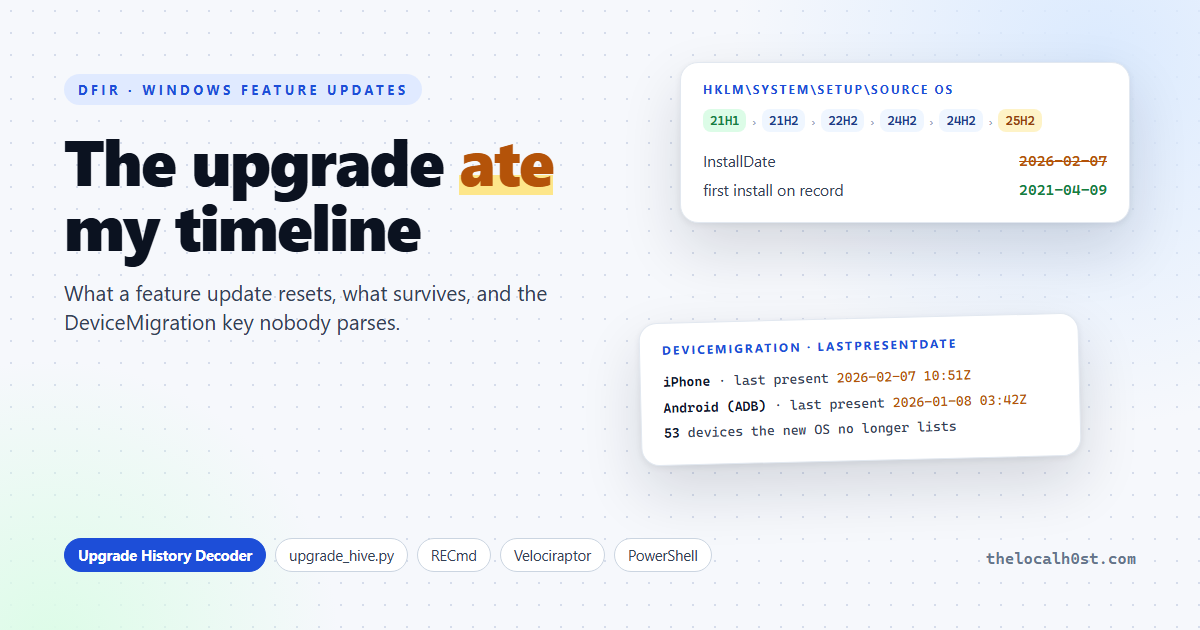
“No Prefetch before February. No USB history before February. The machine was built in February.”
All three sound like findings. On my laptop the last one is wrong by almost five years, and the first two only mean not recorded.
A Windows feature update is the quietest evidence killer on a fleet. It reinstalls the OS, carries some artifacts across and starts others from zero. In September, Alexandru Stamate (AlexSta CyberSecurity) published careful controlled tests of exactly this, and noted that no common tool parses one of the most useful keys it leaves behind. I took the same questions to a real machine, my own laptop with five in-place upgrades since 2021, and built the tooling that was missing.
TL;DR
InstallDateis the last upgrade, not the first install. The oldestHKLM\SYSTEM\Setup\Source OS (Updated on …)key holds the real one.- After a media upgrade, Prefetch, BAM, PCA, most event logs, setupapi and the live USBSTOR / Enum tree start at the upgrade. Nothing before that date means not recorded, not did not happen.
DeviceMigrationkeeps the old OS’s device list, and every disconnected device carriesLastPresentDateand a readable name. On my laptop: 53 devices the live Enum no longer has, including an Android phone with ADB, last connected a month before the upgrade.- Four timestamp traps:
InstallDate, reset key LastWrite times, local-vs-UTC with a gap of days, and clean files that look timestomped.- Paste one line into the Upgrade History Decoder, or grab the kit: PowerShell, an offline hive parser, RECmd and Velociraptor.
One laptop, five upgrades
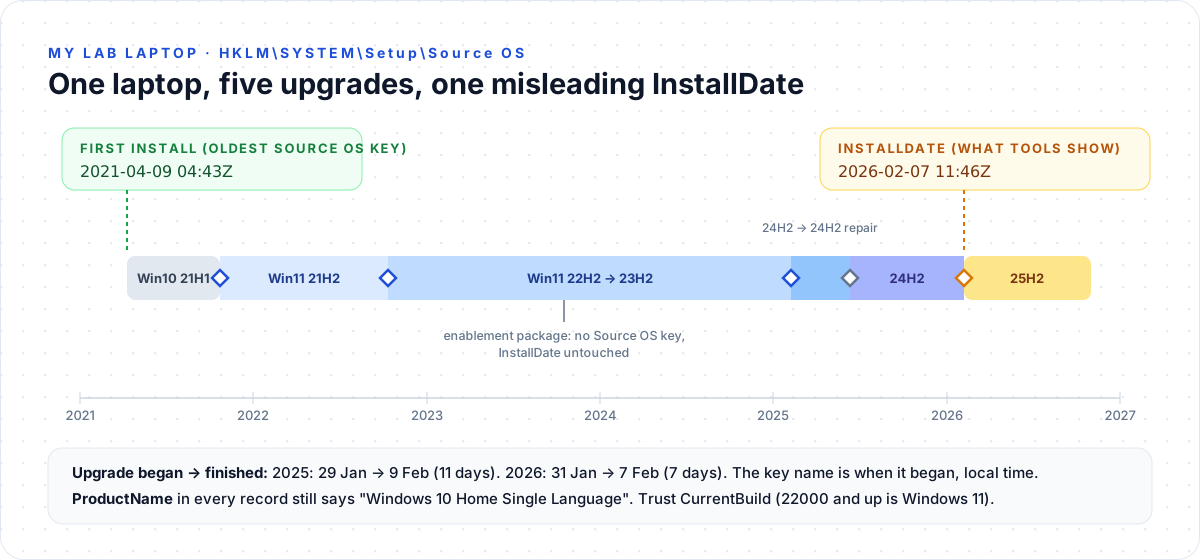 The real upgrade history of my lab laptop, read from the registry
Every in-place upgrade leaves a key under HKLM\SYSTEM\Setup named Source OS (Updated on <date>). It holds the CurrentVersion values of the OS that was replaced. Sort them by their InstallDate and you have the machine’s whole life.
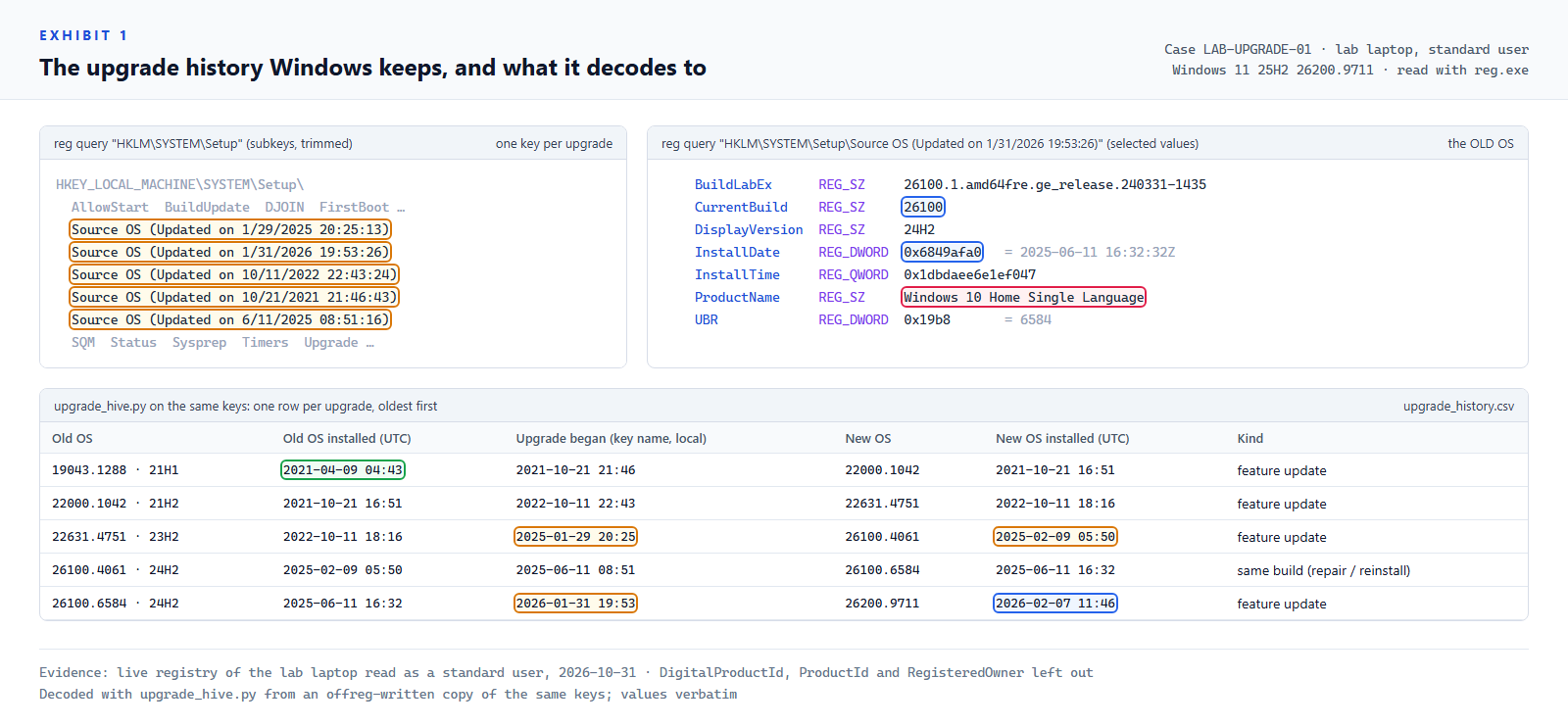 Exhibit 1: five Source OS keys, one of them opened, and the decoded history
Reading Exhibit 1:
- Amber, the key names: when each upgrade began, in local time. The 2025 and 2026 upgrades began 11 and 7 days before the new OS finished installing. Anything in that gap still ran on the old OS.
- Blue, the values: the old OS’s build and its
InstallDate. The last row’s newInstallDate, 2026-02-07, is what every tool reports as “installed”. - Green, the oldest record: the real first install, 2021-04-09.
- Rose,
ProductName: still “Windows 10” on every Windows 11 build. TrustCurrentBuild(22000 and up is Windows 11). - No key between 22H2 and 23H2: that step was an enablement package. It left no record and didn’t touch
InstallDate. A build that moved without a new Source OS key was most likely an enablement package, and AlexSta found those rebuild nothing.
Decode your own host
Run the one line on any host (PowerShell, Live Response, your EDR’s shell), paste the output, done. It runs in your browser.
What resets, what survives
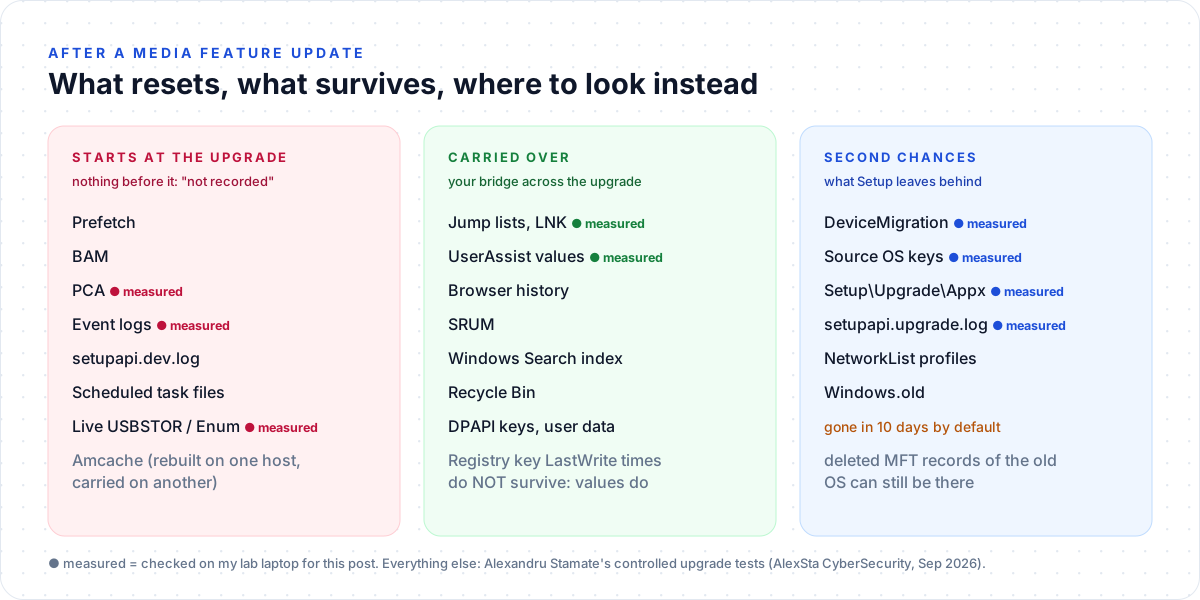 The evidence floor, and the bridges across it
I measured what a standard user can read on the laptop, nine months after its last upgrade:
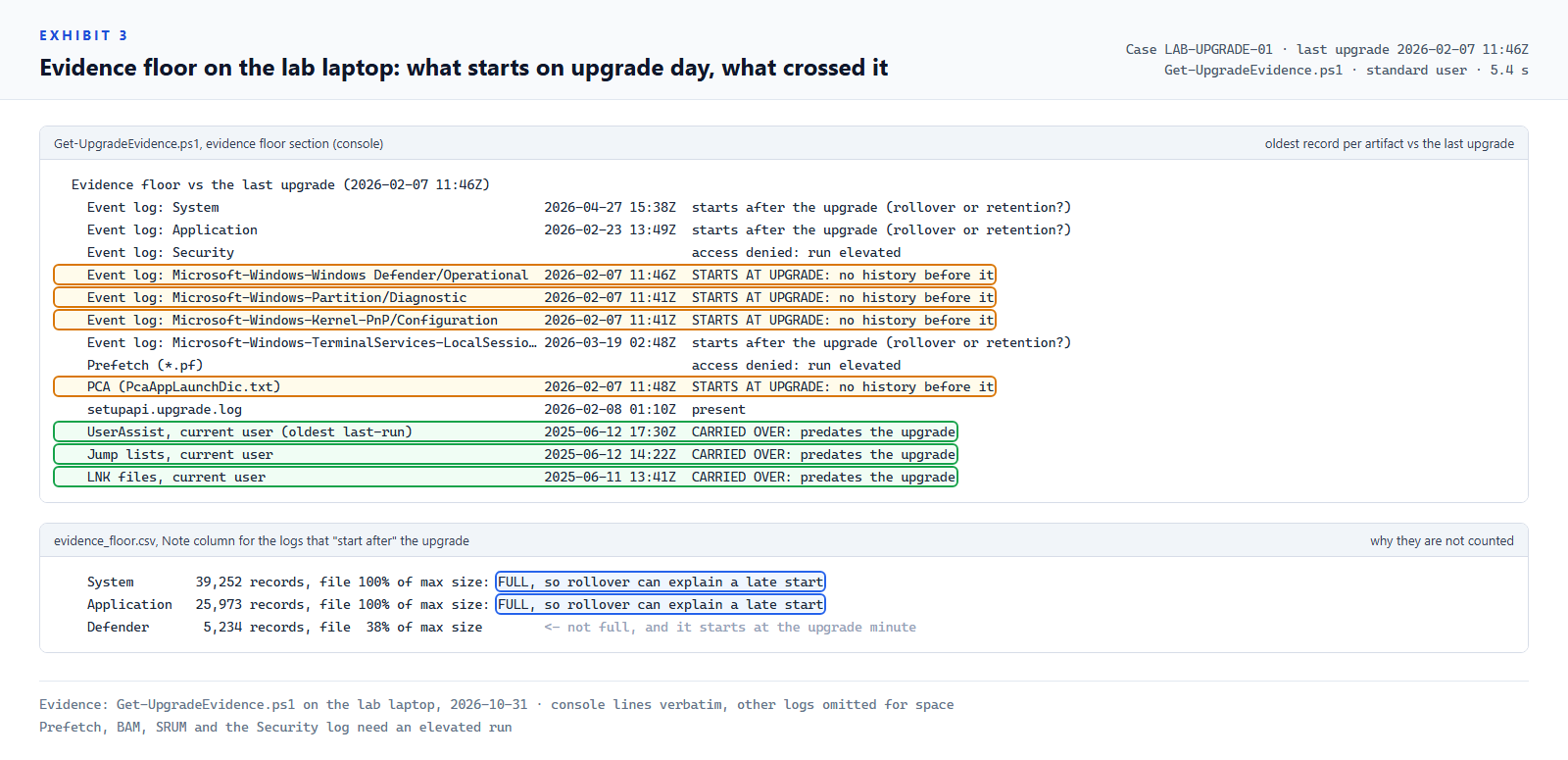 Exhibit 3: what starts on upgrade day, and what crossed it
- Amber rows: Defender, Partition and Kernel-PnP logs start within minutes of the upgrade, and PCA’s file was created two minutes after
InstallDate. That is the evidence floor. - Blue, in the notes panel: System and Application start later, but they are 100% full. That is rollover, not the upgrade. Check log fullness before you blame the upgrade (the script does).
- Green rows: UserAssist values, jump lists and LNK files crossed the February upgrade intact.
One thing I didn’t expect: all three green artifacts start on 11 and 12 June 2025, the day of the same-build repair reinstall, not the feature update. One laptop isn’t proof, but a “repair” reinstall may cut deeper than a feature update. Check yours.
DeviceMigration: a device timeline nobody parses
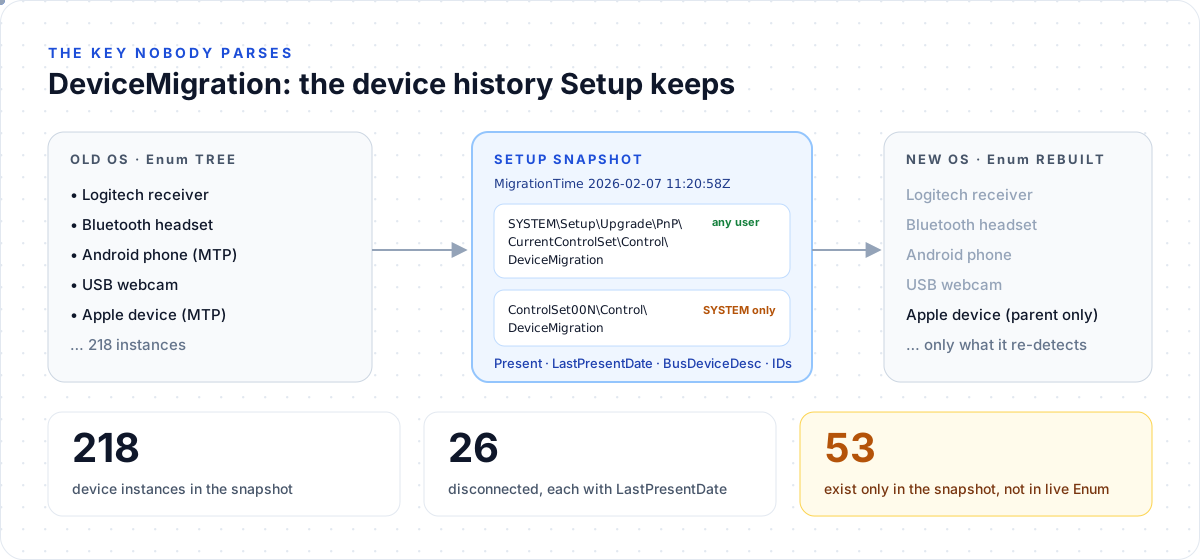 Setup snapshots the old OS’s device database before it rebuilds Enum
During the upgrade, Setup copies the old OS’s Plug and Play database into DeviceMigration. It sits in two places:
| Location | Who can read it live |
|---|---|
HKLM\SYSTEM\Setup\Upgrade\PnP\CurrentControlSet\Control\DeviceMigration | any user |
HKLM\SYSTEM\ControlSet00N\Control\DeviceMigration | SYSTEM only (empty to a normal user) |
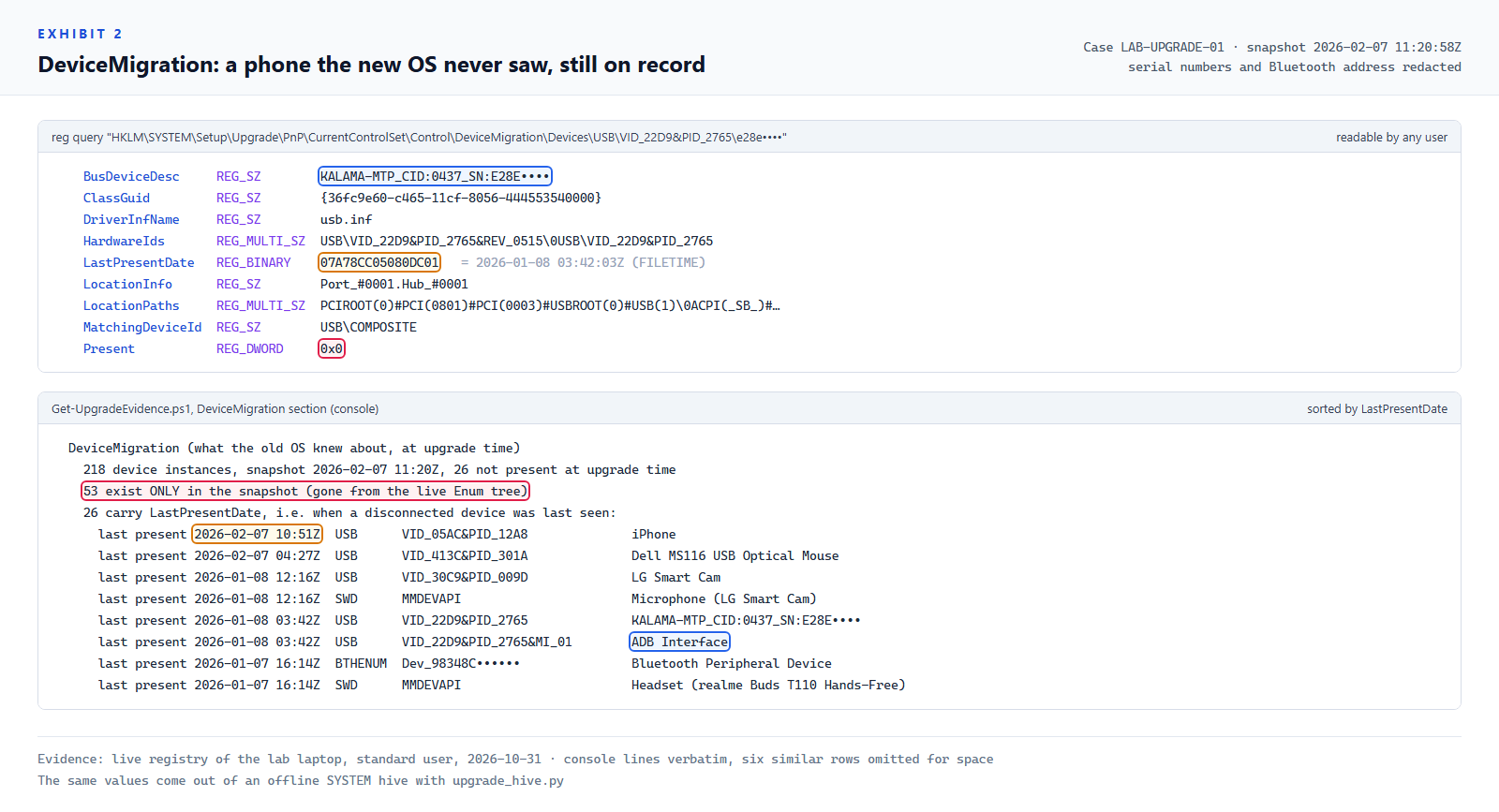 Exhibit 2: one phone the new OS never saw, and the timeline the snapshot gives you
Reading Exhibit 2:
Present= 0 (rose): the device was not connected when the snapshot was taken.LastPresentDate(amber): a FILETIME, when that device was last connected. Every one of the 26 disconnected devices on my laptop had one.BusDeviceDesc(blue): the device’s own name, here with its serial number. The phone’s second interface readsADB Interface: USB debugging was on.- 53 instances exist only in the snapshot. The rebuilt Enum tree has no trace of them: a Bluetooth headset, a webcam, the phone, an iPhone’s MTP interface.
AlexSta found USB storage in DeviceMigration that the live USBSTOR key had lost. My laptop never had a USB drive, but phones, an iPhone, a webcam and Bluetooth audio came through, with names and last-connected times. In a data-theft case, that is exactly the pre-upgrade history the rebuilt USBSTOR can’t give you.
Four timestamp traps
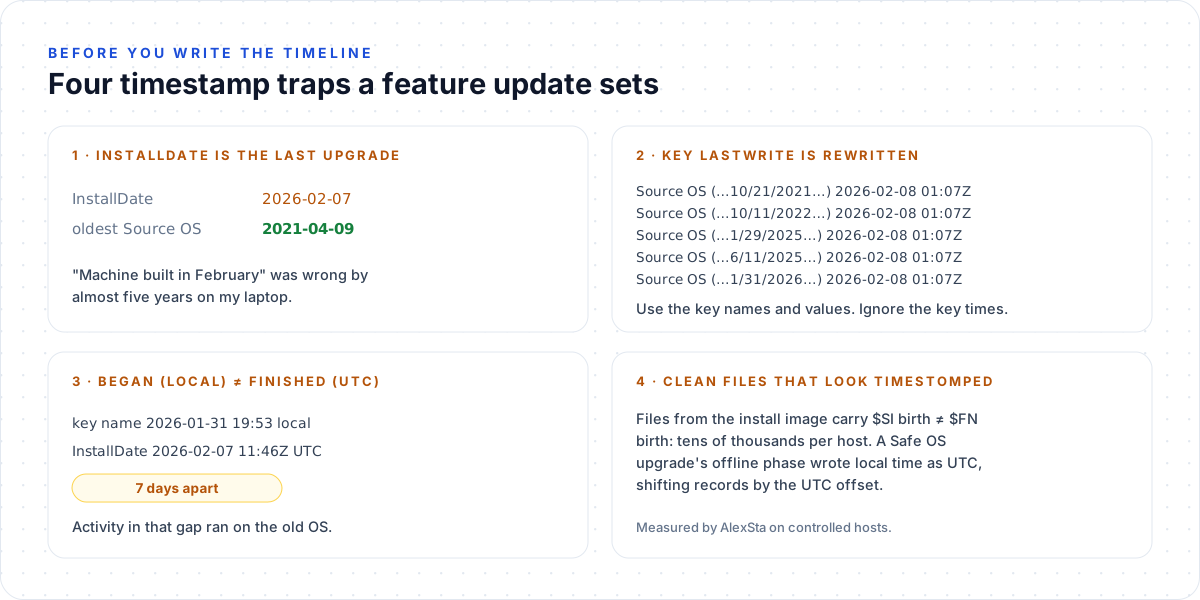 Write these at the top of the timeline before anyone reads it
Trap 2 surprised me most: the last upgrade rewrote every Source OS key, so all five share one LastWrite time, 2026-02-08 01:07Z. The names and values keep the history; the key times don’t.
The Feature Update Evidence Kit
| File | What it does |
|---|---|
| Get-UpgradeEvidence.ps1 | Live triage in seconds: upgrade history, evidence floor per artifact (with log fullness), DeviceMigration diffed against Enum with LastPresentDate, Windows.old, the old app list. CSVs out. Run elevated for Prefetch, BAM, SRUM and the Security log |
| upgrade_hive.py | Offline: reads raw SYSTEM and SOFTWARE hives (its own regf parser, stdlib only). Upgrade history, both DeviceMigration copies, OnlyInSnapshot, LastPresentDate, vendors, the old OS’s apps |
| FeatureUpdateEvidence.reb | RECmd batch file: Source OS keys, DeviceMigration (both copies, LastPresentDate as FILETIME), InstallDate |
| Custom.Windows.Registry.FeatureUpdateEvidence.yaml | Velociraptor artifact: the same, across the fleet, with live-Enum lookups |
1
powershell -ExecutionPolicy Bypass -File .\Get-UpgradeEvidence.ps1
1
2
python3 upgrade_hive.py SYSTEM --software SOFTWARE -o upgrade_evidence/
RECmd.exe -f SYSTEM --bn FeatureUpdateEvidence.reb --csv out
Tested in the lab: the PowerShell script on the laptop above, and
upgrade_hive.pyon hives written by Windows’ own Offline Registry Library from the same keys (a standard user can’treg save). Both produced the numbers in this post. The RECmd batch file and the Velociraptor artifact validate as YAML but haven’t been run in those tools yet; tell me in the comments if either misbehaves.
Response checklist
- Decode the upgrade history first. Write the evidence floor (the last
InstallDate) at the top of the timeline. - Upgrade younger than 10 days? Image
C:\Windows.old,C:\$WINDOWS.~BTandC:\Windows\Panthernow. Windows deletes them when the rollback window closes (DISM /Online /Get-OSUninstallWindow, 10 days by default). - Pull DeviceMigration (both copies), diff it with
Enum, and add everyLastPresentDateto the device timeline. - Before the floor, pivot to what carries over: jump lists, LNK, browser history, SRUM, UserAssist values, NetworkList.
- Don’t read absence as innocence before the floor, and don’t call
$SI ≠ $FNon system files timestomping until you’ve ruled out install-image files. - Name the upgrade kind in your report: feature update, same-build repair, or enablement package. They wipe different things.
References
- Alexandru Stamate, AlexSta CyberSecurity: What a Windows feature update does to forensic evidence (the controlled tests this post builds on)
- Microsoft: DISM operating system uninstall command-line options · Offline Registry Library
- Eric Zimmerman: RECmd · Velociraptor docs
- On this blog: the PCA artifact · Amcache · Inside the registry