Amcache-ProgramID — The Orphan Dll Attribution
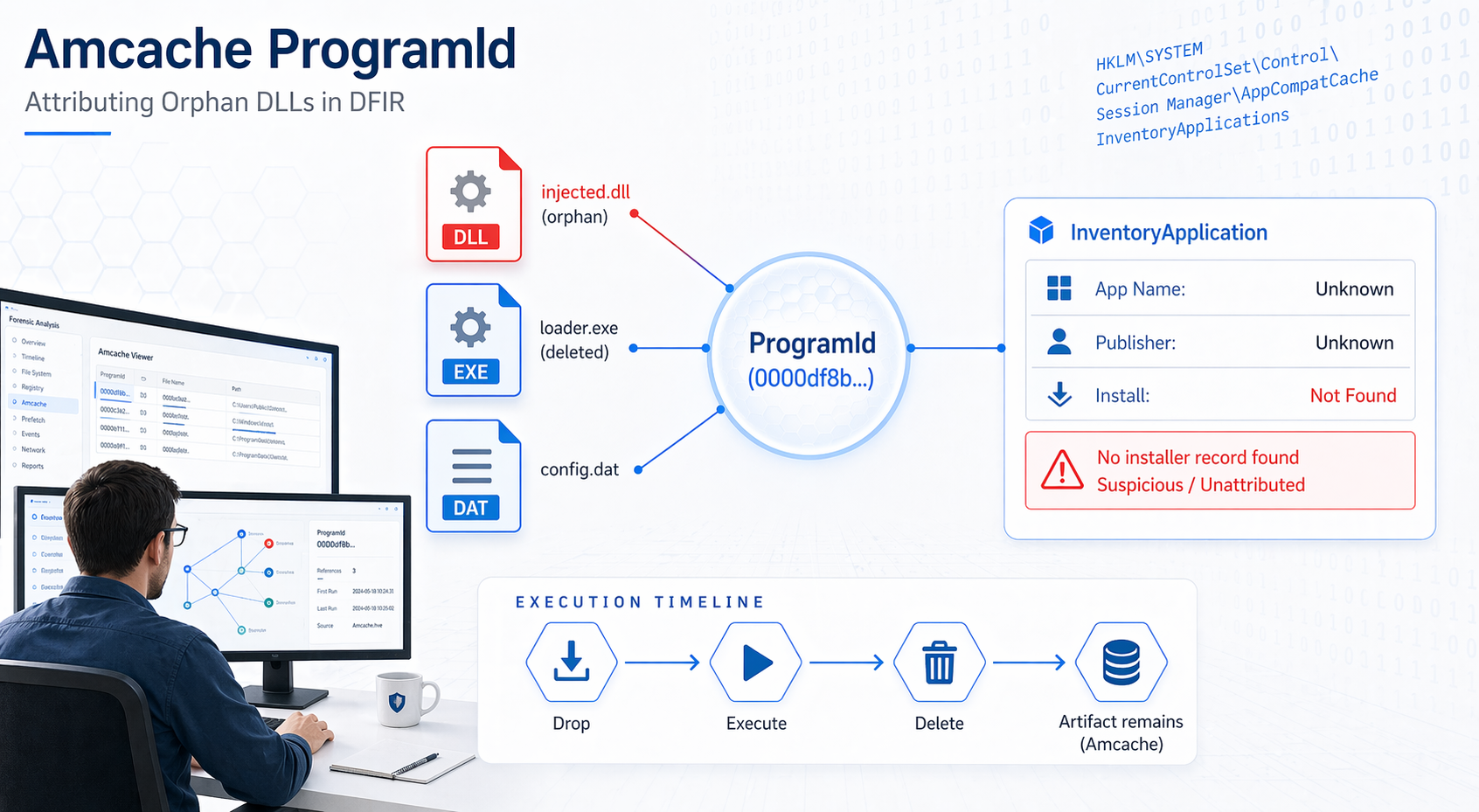
Amcache ProgramId — Connecting Independent DLLs to Their Parent Applications
1. What Is ProgramId — Plain & Simple
ProgramId is a unique hash identifier assigned to every software package tracked by Amcache.
It is generated from a combination of:
- Binary name
- Version
- Publisher
- Language (LCID)
- Some zero-padding prepended to the hash[1]
Why does it matter?
Every file (EXE, DLL, SYS) that belongs to the same installed program shares the same ProgramId. This is the forensic thread that ties all scattered files back to a single parent application.
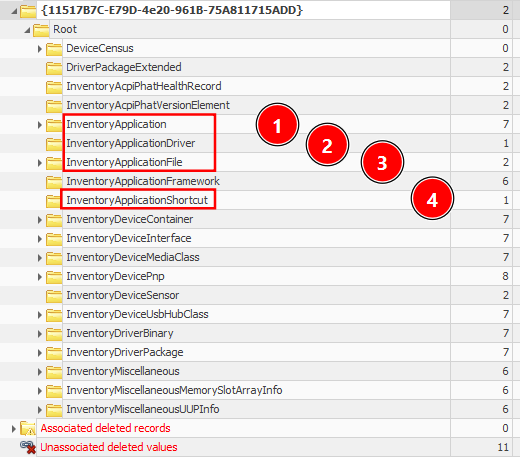
2. Amcache Architecture — The 3 Keys You Must Know
1
2
3
4
5
6
Amcache.hve
└── Root
    ├── InventoryApplication         ← Installed app metadata (name, publisher, install date)
    ├── InventoryApplicationFile     ← Every EXE/DLL seen on the system
    ├── InventoryDriverBinary        ← Kernel-mode drivers loaded
    └── InventoryApplicationShortcut ← .lnk shortcuts observed
| Key | What It Stores | Execution Evidence? |
|---|---|---|
InventoryApplicationFile | Metadata for every executable/DLL encountered | Possibly — presence = likely executed |
InventoryApplication | Formally installed apps (Add/Remove Programs, MSI) | No — installation proof only |
InventoryDriverBinary | Loaded kernel-mode drivers | Yes — driver was in memory |
InventoryApplicationShortcut | .lnk files on Desktop/Start Menu | Possibly — combine with Prefetch |
3. The ProgramId Link — How It Works Internally
3.1 Inside InventoryApplicationFile
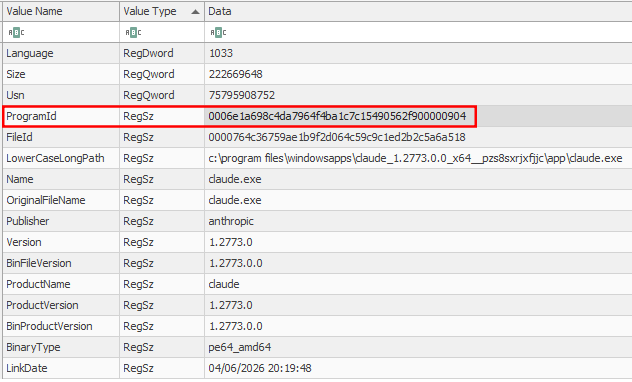
Every subkey under this path represents a single file (EXE or DLL). Each subkey holds:
| Field | Description | Example |
|---|---|---|
ProgramId | Shared ID linking this file to its parent program | 0000df8b9... |
FileID | SHA-1 hash of the file (first 4 chars are 0000) | 00005a4f1b3... |
LowerCaseLongPath | Full lowercase path on disk | c:\program files\7-zip\7z.dll |
Name | Filename only | 7z.dll |
OriginalFileName | PE header original name | 7z.dll |
Publisher | Vendor name | Igor Pavlov |
Version | Build version | 22.01 |
BinaryType | 32-bit or 64-bit | pe64_amd64 |
ProductName | Product suite name | 7-Zip |
LinkDate | PE compilation timestamp | 2022-07-15 00:00:00 |
Size | File size in bytes | 1,646,080 |
IsOsComponent | Is it a Windows built-in? | False |
3.2 Inside InventoryApplication
This key’s subkey names ARE the ProgramIds.
1
2
3
4
5
6
7
Root\InventoryApplication\
    └── 0000df8b9a4c3...         ← The subkey NAME is the ProgramId
            Name         = 7-Zip 22.01
            Publisher    = Igor Pavlov
            InstallDate  = 2024-03-10
            Version      = 22.01
            Source       = AddRemoveProgram
The Pivot: Take the ProgramId from any DLL → find the matching subkey name in InventoryApplication → you now have the parent application name, publisher, version, and install date.[3]
4. The Orphan DLL Scenario — Step-by-Step
Scenario Setup
You are investigating a compromised host. You find a suspicious DLL:
1
c:\users\victim\appdata\local\temp\injected.dll
The file no longer exists on disk. No parent EXE is visible. This is an orphan DLL.
Step 1 — Extract Amcache
1
2
3
4
# Must be run as Administrator or on an offline image
AmcacheParser.exe -f "C:\Windows\AppCompat\Programs\Amcache.hve" `
                  -i `
                  --csv "C:\Output\Amcache"
-iflag is critical — it includes associated file entries (files linked to a known program), not just unassociated ones.
Step 2 — Understand What CSVs Are Produced
AmcacheParser outputs up to 6 CSV files:
| CSV Filename | Source Key | What’s Inside |
|---|---|---|
*_ProgramEntries.csv | InventoryApplication | Installed apps with ProgramId as identifier |
*_AssociatedFileEntries.csv | InventoryApplicationFile | Files that map to a known ProgramId |
*_UnassociatedFileEntries.csv | InventoryApplicationFile | Loose files — no matching installed program |
*_DriverBinaries.csv | InventoryDriverBinary | Drivers (name, hash, signature status) |
*_DriverPackages.csv | InventoryDriverPackage | Driver INF package metadata |
*_ShortCuts.csv | InventoryApplicationShortcut | .lnk file records |
🔑 Key Insight:
UnassociatedFileEntries.csv= your primary malware hunting ground. These are files with no known installer parent — standalone droppers, credential dumpers, lateral movement tools.
5. ProgramId — The Attribution Pivot in Action
5.1 What the Raw Data Looks Like
In AssociatedFileEntries.csv (or the InventoryApplicationFile key):
1
2
3
4
ProgramId,              SHA1,        Name,          LowerCaseLongPath,                       Size,    LinkDate
0000df8b9a4c3...,  5a4f1b3c...,  7z.dll,    c:\program files\7-zip\7z.dll,        1646080, 2022-07-15
0000df8b9a4c3...,  9b2e3a1d...,  7-zip.exe, c:\program files\7-zip\7-zip.exe,     1048576, 2022-07-15
0000df8b9a4c3...,  3c1f9a2b...,  7zfm.exe,  c:\program files\7-zip\7zfm.exe,       823296, 2022-07-15
All three share the same ProgramId → they all came from 7-Zip installation.[2][1]
In ProgramEntries.csv (from InventoryApplication):
1
2
ProgramId,             Name,    Publisher,    Version,  InstallDate,  Source
0000df8b9a4c3...,  7-Zip 22.01, Igor Pavlov,  22.01,  2024-03-10,   AddRemoveProgram
5.2 The Forensic Pivot (Orphan DLL Case)
1
2
3
4
5
6
7
8
9
10
11
12
13
[ORPHAN DLL] injected.dll
 → ProgramId: 0000af91c3b72...          ← From UnassociatedFileEntries.csv

[SEARCH] ProgramEntries.csv for ProgramId = 0000af91c3b72...
 → NOT FOUND                            ← No formal installer → This is suspicious

[SEARCH] AssociatedFileEntries.csv for same ProgramId
 → FOUND: loader.exe @ C:\Users\victim\AppData\Local\Temp\loader.exe
          injected.dll @ C:\Users\victim\AppData\Local\Temp\injected.dll
          config.dat   @ C:\Users\victim\AppData\Local\Temp\config.dat

[RESULT] loader.exe dropped injected.dll. Same ProgramId = same software package.
         Even though loader.exe is gone from disk, Amcache recorded it.
This is the core attribution chain.
6. ProgramId Format — Decoded
The ProgramId is not random. It follows a deterministic structure:
1
2
3
4
5
6
0000 + [SHA-256-derived hash of: FileName + Version + Publisher + Language]

Example:
0000df8b9a4c321fe7a819b24c3d5e6f7a8b9c0d1e2f3a4b5c6d7e8f9a0b1c2d
│──┘ └────────────────────────────────────────────────────────────────┘
Padding           Hash derived from binary metadata
Implication for Forensics:
- Two identical DLLs from the same installer → same ProgramId, every time
- A renamed malicious DLL masquerading as a legit one → different ProgramId (metadata mismatch) → detectable anomaly[4][1]
7. SHA-1 in Amcache — The Critical Caveat
Amcache stores SHA-1 hashes, but with a limitation:
| File Size | SHA-1 Behavior |
|---|---|
| < 31 MB (31,457,280 bytes) | Full file SHA-1 stored correctly |
| > 31 MB | SHA-1 only of the first 31 MB is stored |
Forensic Impact:
- Always check the
Sizefield first - If
Size > 31,457,280→ the stored SHA-1 is partial → VirusTotal lookup may fail - Attackers can exploit this: pad malware to >31 MB to make hash lookups blind[11][1]
8. Associated vs Unassociated — The Key Distinction
1
2
3
4
5
6
7
8
9
10
11
┌────────────────────────────────────────────────────────────────┐
│                    InventoryApplicationFile                    │
│                                                                │
│   File Entry → ProgramId exists in InventoryApplication?      │
│                                                                │
│         YES ──────────────────► AssociatedFileEntries.csv      │
│         (Formally installed software — Chrome, 7-Zip, etc.)   │
│                                                                │
│         NO  ──────────────────► UnassociatedFileEntries.csv    │
│         (Standalone EXE/DLL — malware, tools, scripts)        │
└────────────────────────────────────────────────────────────────┘
Forensic Logic:
AssociatedFileEntries= benign baseline (mostly — whitelisting helps reduce noise)UnassociatedFileEntries= start your investigation here- If a DLL appears in
Unassociatedbut itsProgramIdmatches anotherUnassociatedEXE → they arrived together as a package, even without a formal installer[9][10]
9. Fields in Each CSV — Cheat Sheet
ProgramEntries.csv
| Column | Description |
|---|---|
ProgramId | Unique ID — the pivot key |
ProgramName | Application name |
ProgramVersion | Version string |
Publisher | Vendor name |
InstallDate | When OS first recorded the app |
UninstallString | Uninstall command (confirms Add/Remove Programs presence) |
Source | AddRemoveProgram / Msi / File |
Language | LCID numeric locale |
AssociatedFileEntries.csv / UnassociatedFileEntries.csv
| Column | Description |
|---|---|
ProgramId | Link to parent program |
SHA1 | File hash (first 31 MB caveat applies) |
FullPath | Full file path on disk |
Name | Filename |
FileVersion | Version from PE header |
ProductName | Product suite |
Publisher | Vendor name |
Size | File size in bytes |
LinkDate | PE compilation timestamp |
BinaryType | pe32 or pe64_amd64 |
IsOsComponent | True/False |
LastModified | Hive key last write time |
DriverBinaries.csv
| Column | Description |
|---|---|
DriverName | Driver filename |
DriverPath | Full path |
SHA1 | File hash |
DriverSigned | Signature status |
DigitalSigner | Certificate authority |
DriverTimestamp | Compilation timestamp |
LastModified | Last write time |
ProgramIds | Parent application ProgramIds |
[12][13][5]
10. Practical Investigation Workflow
1
2
3
4
5
6
7
8
9
10
11
12
13
14
15
16
17
18
19
20
21
22
23
24
25
STEP 1: Acquire Amcache.hve
        → KAPE (AmcacheParser target) or manual copy (VSS shadow if locked)

STEP 2: Parse with AmcacheParser
        AmcacheParser.exe -f Amcache.hve -i --csv C:\Output

STEP 3: Open in Timeline Explorer
        Load all CSVs simultaneously → sort by ProgramId column

STEP 4: Hunt Orphan DLLs
        → Filter UnassociatedFileEntries.csv for .dll extension
        → Note ProgramId of suspicious DLLs

STEP 5: Cross-Reference ProgramId
        → Search that ProgramId across ALL other CSVs
        → If it appears in AssociatedFileEntries → find the parent EXE
        → If it appears only in Unassociated → standalone drop (no installer)

STEP 6: Hash Lookup
        → Take SHA1 from FileID field (strip leading 0000)
        → Submit to VirusTotal / OpenTIP (check size first!)

STEP 7: Timeline Correlation
        → Cross-reference LinkDate (PE compile time) with Prefetch / Event Logs
        → Align with intrusion timeline
11. Real-World Attack Scenario — End-to-End
Scenario: Ransomware dropper that self-deleted after injecting a DLL.
1
2
3
4
5
6
7
8
9
10
11
12
13
14
15
16
17
18
19
20
21
22
23
Evidence on disk: NOTHING (files self-deleted)

In Amcache UnassociatedFileEntries.csv:
───────────────────────────────────────────────────────────────────────────
ProgramId             | Name           | FullPath                          | SHA1         | Size
0000a1b2c3d4e5f6...  | svchostx.exe   | C:\Windows\Temp\svchostx.exe      | 3f4a1b2c...  | 245760
0000a1b2c3d4e5f6...  | inject32.dll   | C:\Windows\Temp\inject32.dll      | 9b8a7c6d...  | 65536
0000a1b2c3d4e5f6...  | config.enc     | C:\Windows\Temp\config.enc        | 2c3d4e5f...  | 1024
───────────────────────────────────────────────────────────────────────────

Observation:
• All 3 files share ProgramId = 0000a1b2c3d4e5f6...
• svchostx.exe (typosquatted) = the dropper EXE
• inject32.dll = payload DLL
• config.enc = encrypted C2 config

• ProgramId NOT in ProgramEntries.csv → no installer → ad-hoc drop
• SHA1 of inject32.dll → VirusTotal hit → Cobalt Strike beacon DLL
• LinkDate = 2024-11-03 → matches the intrusion date from Event Logs

RESULT: inject32.dll is conclusively attributed to svchostx.exe via ProgramId.
        Timeline: dropped together, executed, self-deleted.
        Evidence survived in Amcache even after deletion.
12. Limitations to Keep in Mind
| Limitation | Impact |
|---|---|
Amcache updates only when Microsoft Compatibility Appraiser runs (compattelrunner.exe) | Recent files may not appear if the scheduled task hasn’t run[1][4] |
InventoryApplicationFile is not a definitive execution log — presence ≠ execution[1] | Correlate with Prefetch, ShimCache, Event Logs |
| SHA-1 is partial for files > 31 MB[11] | Check Size field before VT lookup |
| Format varies by Amcache DLL version, not OS version[4] | Two Win10 systems at different patch levels may differ |
| Attackers can pad binaries to evade hash lookup[1] | Never rely on hash alone |
13. Quick Reference — ProgramId Pivot Logic
1
2
3
4
5
6
7
8
9
10
DLL found (orphan) → Grab its ProgramId
    │
    ├── Search ProgramEntries.csv?
    │       YES → Formally installed → Get app name, publisher, install date
    │       NO  → Not installed → Treat as suspicious
    │
    └── Search AssociatedFileEntries.csv / UnassociatedFileEntries.csv?
            Found other files with same ProgramId?
                YES → All those files arrived together → Parent EXE identified
                NO  → Single isolated file → High suspicion → Full analysis needed
Artifact location: C:\Windows\AppCompat\Programs\Amcache.hve
Tool: AmcacheParser by Eric Zimmerman (EZTools suite)
Parser flag for full output: -i (include program-associated entries)