Prefetch Alternate Data Stream How Malware Hides Execution
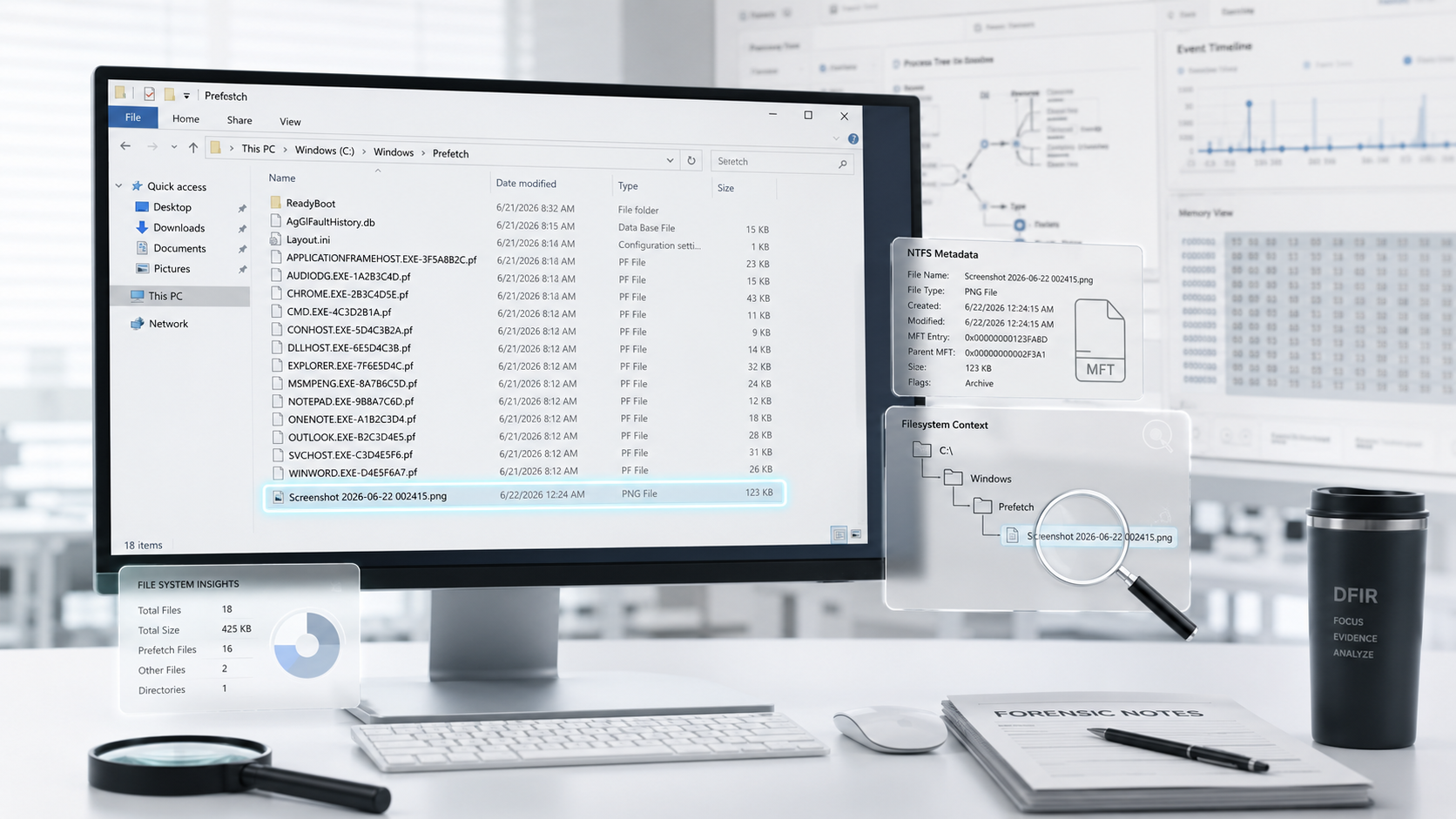
Guest in C:\Windows\Prefetch: How ADS Can Hide Execution Evidence
C:\Windows\Prefetch is normally a predictable directory. Most systems contain .pf files, Layout.ini, and the ReadyBoot directory.
So, what does it mean when a .txt, .png, or another unexpected file appears there—particularly when the file is 0 bytes?
During a recent investigation, Mihir Choudhary identified an unusual Prefetch behavior associated with malware executed from an NTFS Alternate Data Stream (ADS). The Prefetch artifact was not missing. Instead, it was stored inside another ADS.
This post documents that observation, the forensic reasoning behind it, and an ongoing contribution to make this behavior easier to identify with PECmd.
The Alert
While reviewing an EDR process-creation alert, a process path immediately stood out:
1
2
3
4
Event ID:     1 (Process Create)
Image:        C:\Users\username\Pictures\Screenshot 2026-06-22 002415.png:malware.exe
CommandLine:  "C:\Users\username\Pictures\Screenshot 2026-06-22 002415.png:malware.exe"
ParentImage:  C:\Windows\System32\wbem\WMIC.exe
The key indicator was the second colon in the image path:
1
Screenshot 2026-06-22 002415.png:malware.exe
The malware.exe component was not a conventional file in the user’s Pictures directory. Instead, it existed as a named Alternate Data Stream attached to an otherwise ordinary PNG image.
1
2
3
4
5
Visible host file:
Screenshot 2026-06-22 002415.png

Hidden ADS payload:
Screenshot 2026-06-22 002415.png:malware.exe
ADS execution is a known Windows defense-evasion technique, documented by MITRE ATT&CK as T1564.004: NTFS File Attributes. The EDR telemetry established what executed and where it came from. The next objective was to corroborate that execution using Windows forensic artifacts.
What the ADS Looked Like
NTFS permits a file to contain multiple data streams. The visible content of a file is its default stream, while named streams can be attached without appearing in Windows Explorer or standard directory listings.
In this case, the PNG file appeared normal:
1
Screenshot 2026-06-22 002415.png
However, it also carried a hidden executable stream:
1
Screenshot 2026-06-22 002415.png:malware.exe
This makes ADS useful for defense evasion:
- Explorer does not normally display named streams
- Standard
diroutput does not reveal them - The visible host file can look harmless
- The visible file hash does not represent the payload in a separate stream
- A superficial review can miss the malicious content entirely
Going to Prefetch
The investigation then moved to C:\Windows\Prefetch to independently validate the execution.
For a normally launched executable, the expected artifact would resemble:
1
2
3
4
5
C:\Windows\Prefetch\
├── CHROME.EXE-1A2B3C4D.pf
├── EXPLORER.EXE-9F8E7D6C.pf
├── MALWARE.EXE-3F2A9C10.pf
├── Layout.ini
No visible MALWARE.EXE-*.pf file was present. Instead, a highly unusual entry appeared:
1
2
3
4
5
C:\Windows\Prefetch\
├── CHROME.EXE-1A2B3C4D.pf
├── EXPLORER.EXE-9F8E7D6C.pf
├── Screenshot 2026-06-22 002415.png
├── Layout.ini
The PNG file was 0 bytes and clearly did not belong in a directory that should primarily contain Prefetch files.
This mismatch became the key finding: EDR confirmed that malware.exe executed, but the corresponding Prefetch file was not visible. Rather than treating this as an absence of evidence, the anomalous PNG file became the investigative lead.
Where the .pf Actually Went
To investigate the unexpected PNG file, its NTFS streams were enumerated:
1
2
Get-Item -Path "C:\Windows\Prefetch\Screenshot 2026-06-22 002415.png" -Stream * |
  Where-Object Stream -ne ':$DATA'
The result revealed the missing Prefetch artifact:
1
2
3
FileName : C:\Windows\Prefetch\Screenshot 2026-06-22 002415.png
Stream   : malware.exe-3F2A9C10.pf
Length   : 32768
The Prefetch record had not been deleted, and it had not failed to generate. It was stored as a named stream attached to the placeholder PNG file.
1
2
3
C:\Windows\Prefetch\
└── Screenshot 2026-06-22 002415.png
    └── :malware.exe-3F2A9C10.pf
The complete path to the hidden Prefetch artifact was:
1
C:\Windows\Prefetch\Screenshot 2026-06-22 002415.png:malware.exe-3F2A9C10.pf
This is an important DFIR distinction: a visible review of the Prefetch directory can suggest that no artifact exists, even though the artifact is present inside an NTFS stream.
Why This Happens
Prefetch filenames generally follow this pattern:
1
<EXECUTABLE NAME>-<HASH>.pf
In this case, the executable was launched from this ADS path:
1
C:\Users\username\Pictures\Screenshot 2026-06-22 002415.png:malware.exe
Based on hands-on analysis and testing, the behavior appears to follow this sequence:
1
2
3
4
5
6
7
8
9
10
11
12
ADS execution path:
...\Screenshot 2026-06-22 002415.png:malware.exe

Prefetch naming result:
Screenshot 2026-06-22 002415.png:malware.exe-3F2A9C10.pf

NTFS interpretation:
The colon is treated as an Alternate Data Stream delimiter.

Final on-disk structure:
Base file: Screenshot 2026-06-22 002415.png
Named stream: malware.exe-3F2A9C10.pf
The result is a 0-byte placeholder file in the Prefetch directory, named after the original ADS host file, while the actual Prefetch record resides in a named stream.
Similar behavior was documented in 2019 by researcher Ali Hadi. This finding independently reinforces that observation and demonstrates how the same behavior can occur when a PNG file is used as the ADS host.
No known Microsoft documentation describes the exact internal implementation or naming logic involved. This explanation should therefore be treated as a repeatable forensic observation rather than a documented Windows API contract.
Extracting and Parsing It
Most Prefetch parsers search for conventional files ending in .pf. A Prefetch artifact stored inside an ADS can therefore be missed during normal processing.
The stream must first be extracted to a regular file before parsing it.
PowerShell
1
2
Copy-Item -Path "C:\Windows\Prefetch\Screenshot 2026-06-22 002415.png:malware.exe-3F2A9C10.pf" `
  -Destination "C:\Analysis\malware.exe-3F2A9C10.pf"
Command Prompt
copy /b "C:\Windows\Prefetch\Screenshot 2026-06-22 002415.png:malware.exe-3F2A9C10.pf" C:\Analysis\malware.exe-3F2A9C10.pf
The extracted file can then be parsed normally:
PECmd.exe -f "C:\Analysis\malware.exe-3F2A9C10.pf"
Once extracted, the artifact can provide standard Prefetch evidence, including execution count, execution timestamps, referenced files and directories, and volume details.
PECmd ADS Support
To make this artifact easier for analysts to find, Mihir is contributing ADS-aware support to PECmd.
The submitted pull request introduces a proposed --ads option for checking Prefetch artifacts stored in Alternate Data Streams.
At the time of writing, this enhancement is under review and has not yet been merged into the main PECmd release. Once accepted, analysts will be able to use the --ads option to check for hidden Prefetch artifacts without manually enumerating and extracting every stream.
PECmd.exe --ads
This feature is especially valuable during time-sensitive incident response. Without ADS-aware analysis, an investigator may incorrectly conclude that Prefetch did not capture a known execution event.
Hunting Checklist
The following practical hunting and triage steps can help identify ADS-resident Prefetch artifacts:
- Flag files in
C:\Windows\Prefetchthat are not.pffiles,Layout.ini, or part ofReadyBoot - Prioritize
0-byte entries, especially files masquerading as.png,.jpg,.txt, or.dat - Check Alternate Data Streams on unexpected files in the Prefetch directory before dismissing them
- Investigate EDR, Amcache, or other execution evidence that has no matching visible
.pffile - Alert on a second colon in a process
ImageorCommandLinefield, such asfile.png:payload.exe - Enable Sysmon Event ID 15,
FileCreateStreamHash, to monitor named-stream creation - Validate that forensic collection tooling preserves NTFS ADS content
The following PowerShell command enumerates nondefault streams within the Prefetch directory:
1
2
3
4
5
Get-ChildItem "C:\Windows\Prefetch" -Force |
  ForEach-Object {
    Get-Item -Path $_.FullName -Stream * -ErrorAction SilentlyContinue
  } |
  Where-Object Stream -ne ':$DATA'
Collection Considerations
ADS-based evidence can be silently lost during acquisition.
A conventional folder copy may preserve only the 0-byte placeholder file while discarding the ADS that contains the actual Prefetch record. Copying files to a non-NTFS destination can also remove named-stream data.
Before relying on a collection workflow, confirm that it preserves:
- Named NTFS Alternate Data Streams
- Prefetch directory contents
- Relevant file-system metadata
- The MFT and USN Journal, where possible
- Original NTFS evidence rather than only exported file copies
Key Takeaways
- A missing visible
.pffile does not prove that Prefetch failed to record execution - A Prefetch artifact created by ADS-based malware execution can itself be stored in an Alternate Data Stream
- Any nonstandard file in
C:\Windows\Prefetch, especially a0-byte PNG or text file, should be immediately checked for streams - Extract ADS-resident Prefetch artifacts to a regular
.pffile before conventional parsing - The proposed PECmd
--adsoption aims to simplify discovery of Prefetch files stored in Alternate Data Streams - Corroborate findings with EDR telemetry, Amcache, ShimCache, Sysmon Event ID 15, the MFT, and the USN Journal
One artifact is a data point; multiple independent artifacts create a defensible execution timeline